What is Pixel Tracking: A Practical Guide to Ad Performance
Ever seen an ad for a product you just looked at on another site and wondered, "How did they know?" The answer, more often than not, is a tracking pixel. At its core, pixel tracking is a simple but incredibly powerful method websites use to understand what you do after you click an ad.
It’s a tiny, often invisible, snippet of code that logs key actions—like which pages you visit, if you click on an ad, or when you make a purchase. This data is the lifeblood for measuring ad campaigns, creating personalized experiences, and really understanding the customer journey from start to finish.
The Invisible Engine Driving Digital Ads
Think of a tracking pixel as an invisible informant on your website. It sits quietly in the background, observing how people interact with your pages and reporting that intel back to your ad platforms. It’s the foundational tech that makes so much of modern digital advertising work, from the hyper-relevant ads you see on social media to the shopping suggestions that feel like they're reading your mind.
This little piece of code is what closes the loop between an ad click and a final sale. Without it, marketers are basically flying blind, throwing money at ads with no real way to know what's working. The data gathered by pixels answers the most critical questions: Which ads are actually driving sales? What products did a visitor look at before they left? Which groups of people are most likely to become customers?
Why Pixel Tracking Matters
For anyone running ads for an e-commerce brand, getting a handle on pixel tracking isn't just a good idea—it's essential. It’s what separates guessing from knowing. The information collected from your pixel is what feeds the powerful machine-learning algorithms on platforms like Meta and Google, helping them find more people who look and act just like your best customers.
A tracking pixel isn’t just a piece of code; it's a direct line of communication between your website and your ad platforms. It translates user clicks, views, and purchases into a language the ad algorithms can understand and act upon.
This constant stream of data is fundamental to a few key jobs in marketing:
Accurate Measurement: It lets you connect the dots, attributing sales and other key actions directly back to specific campaigns, ads, or audiences. This gives you a clear, honest look at your return on ad spend (ROAS).
Audience Building: Pixels are the magic behind creating high-value audiences for retargeting. Think of those classic "cart abandoner" campaigns that bring shoppers back to finish their purchase—that's the pixel at work.
Campaign Optimization: Ad platforms use the data from your pixel to get smarter. They automatically fine-tune ad delivery to show your ads to the people who are most likely to take the action you want them to, whether it's signing up for a newsletter or buying a product.
Ultimately, knowing what pixel tracking is and how to use it correctly is the first step to building a smart, resilient, and profitable advertising strategy. It turns raw website traffic into actionable intelligence that fuels growth, stops you from wasting money, and helps you create better, more relevant experiences for your customers.
How Tracking Pixels Actually Work
The whole idea of a tiny, invisible image following you around the internet can sound a bit like spy fiction. But in reality, the mechanics are surprisingly simple. It’s a clean, efficient process that your web browser handles thousands of times a day without you ever noticing. The whole thing starts with a single, transparent 1x1 pixel tucked away in a website's code.
This pixel isn't there to be seen—its job is to act as a trigger. When you load a webpage, your browser reads the HTML code line by line. As soon as it hits the code snippet for the tracking pixel, it treats it like any other image and sends a request to the server where that tiny, invisible image is hosted. That request is the key.
This is where the magic really happens. The request your browser sends isn't just asking for the pixel; it’s carrying a small but valuable packet of information with it. This data hand-off is the core of how tracking pixels work, turning a simple page load into a rich data event.
The Journey of a Data Request
Think of it like this: a digital librarian is stamping a library card. Every time you interact with the website (the library), the pixel (the librarian) makes a quick note. This "stamp" contains specific details about your visit, which are then sent back to a tracking server to be logged and analyzed.
So, what’s in that data packet? It typically includes a few key pieces of information:
Device Information: This covers the type of device you're on (like a phone or desktop), your operating system, and which web browser you're using.
User Actions: The pixel logs the specific page you landed on or an action you took, like adding a product to your cart.
IP Address: This gives an approximate geographical location, helping marketers get a sense of where their audience is.
Timestamps: It records the exact time and date of your visit, which is crucial for spotting patterns in user behavior over time.
This straightforward, three-step process is how a simple website visit gets translated into useful data for an advertising platform.
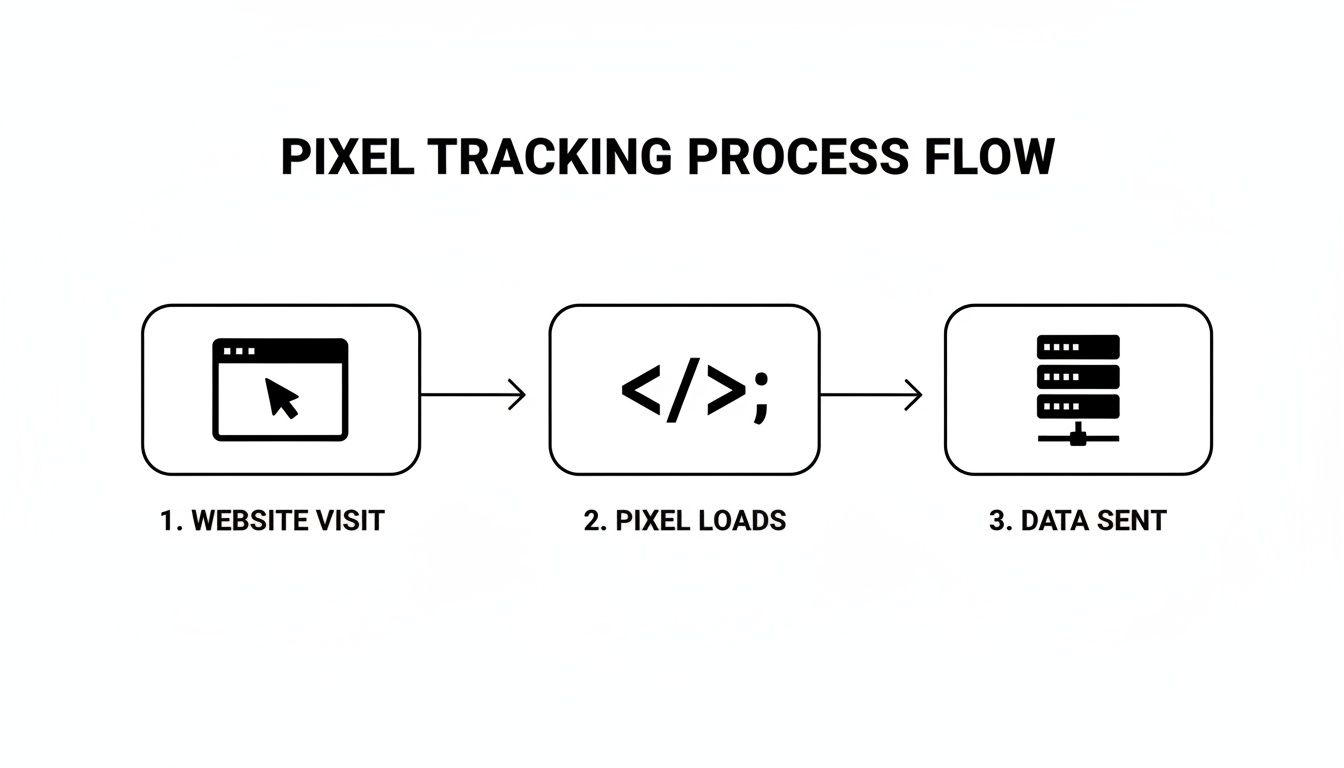
As you can see, the pixel simply acts as a bridge. It kicks off a data transfer from your browser to a third-party server the moment the page starts to load.
From Code Snippet to Actionable Insight
This entire exchange happens in the blink of an eye. The 1x1 pixel is so small that it has zero impact on a website’s loading speed, and since it’s transparent, it’s completely invisible. Yet, ever since it emerged in the late 1990s, this tiny piece of code has become the backbone of modern digital advertising.
It's estimated that tracking pixels are now on 75% of websites worldwide, fueling an advertising industry that brings in over $100 billion a year in the U.S. alone. They’re so widely used because they can capture everything from page views and IP addresses to device types and browser details, painting a detailed picture of user behavior. You can dive deeper into the history and impact of pixels on Orchid's blog.
In essence, a tracking pixel is a messenger. It doesn’t store anything on your computer the way a cookie does. It just observes an action and reports back to its home server with a quick summary of what happened.
This fundamental mechanism is what lets advertisers measure conversions, build retargeting audiences, and fine-tune their ad campaigns with impressive accuracy. Once you understand this technical flow—from the pixel loading in your browser to the data being logged on a server—you start to see how clicks, views, and purchases become the metrics that drive performance marketing. It demystifies the whole thing, showing it’s less about digital spying and more about efficient, data-driven communication.
The Most Common Types of Tracking Pixels
Now that we’ve pulled back the curtain on how a pixel technically works, let's talk about the specific tools performance marketers live and breathe every day. While the basic idea is the same, each major ad platform has its own flavor of pixel. Think of them as dedicated ambassadors, sending critical intel back to their home platforms to unlock smarter targeting and measurement.
For just about any e-commerce brand, two pixels are absolutely non-negotiable: the Meta Pixel (you might remember it as the Facebook Pixel) and the Google Ads Pixel. These aren't just slightly different versions of the same thing. They are the foundational engines of their respective ad platforms, built from the ground up to capture the user actions that fuel successful campaigns.
The Meta Pixel: The Social Commerce Engine
The Meta Pixel is a snippet of code that you install on your website to report user actions back to Meta's ecosystem, covering both Facebook and Instagram. It's basically Meta’s eyes and ears on your turf. Its main job is to help you figure out if your ads are actually working by tracking what people do after they see them.
This data is the lifeblood for three key functions:
Targeting: It’s what lets you build Custom Audiences of people who’ve visited your site or done something specific, like adding an item to their cart. This is the magic behind those eerily effective retargeting ads.
Optimization: The pixel feeds conversion data straight into Meta's algorithm. The algorithm then gets smarter, learning to show your ads to people who are most likely to convert, which helps push down your cost-per-acquisition (CPA).
Measurement: It draws a direct line from an ad view on Instagram to a sale on your website, giving you a crystal-clear look at your return on ad spend (ROAS).
Without it, you’re basically flying blind on social media, unable to prove ROI or build the sophisticated audience segments that make campaigns profitable. For a deeper dive into a more durable, server-side tracking method, check out our guide on the Meta Conversions API, which works hand-in-hand with the pixel.
The Google Ads Pixel: The Search Intent Connector
On the other side of the fence, the Google Ads Pixel (often called the Google Ads conversion tracking tag) plays a similar role within Google's sprawling ad network. Its primary focus is all about user intent—capturing the actions of people who land on your site from search, display, or YouTube ads.
While Meta is a powerhouse at connecting social discovery to a sale, Google’s pixel is a master at linking what someone is actively searching for to a conversion. It helps you understand which keywords, ads, and campaigns are actually driving sales, allowing you to fine-tune your bids and ad copy for the biggest impact.
The Meta Pixel tracks the journey from social discovery to purchase, while the Google Ads Pixel tracks the journey from active search intent to conversion. Both are essential for a complete view of the customer journey.

Tracking Standard Events For E-commerce
The real muscle behind these pixels is their ability to track specific, standardized actions called events. Instead of just knowing that someone visited your site, you can follow their entire journey from window shopper to paying customer. For an e-commerce store, especially one on a platform like Shopify, these events are the fundamental building blocks of performance marketing.
To illustrate, let's compare the key events that both the Meta and Google pixels are designed to capture in an e-commerce context.
Meta Pixel vs Google Ads Pixel Standard Events
Event Type | Meta Pixel Event | Google Ads Pixel Equivalent (Conversion Action) | Why It Matters for E-commerce |
|---|---|---|---|
Basic Traffic |
|
| The baseline event. It confirms the pixel is working and captures all site visitors for top-of-funnel retargeting. |
Product Interest |
|
| Someone is looking at a specific product. This is crucial for dynamic retargeting ads that show the exact product they viewed. |
High Intent |
|
| A strong buying signal. This group is perfect for "abandoned cart" campaigns to nudge them toward purchase. |
Checkout Started |
|
| The user is serious about buying. If many users drop off here, it could signal friction in your checkout process. |
The Final Goal |
|
| The most important conversion. This event feeds ROAS and CPA calculations and trains the ad platform's algorithm on what a valuable customer looks like. |
By tracking these distinct actions, you’re not just collecting data; you’re building a detailed map of your entire customer funnel. This is what allows you to build incredibly precise audiences—like targeting everyone who added a specific product to their cart but didn't buy—and gives the ad platforms the exact signals they need to go out and find more people just like your best customers.
Turning Pixel Data Into Smarter Ad Spend
Collecting data is just the starting point. The real magic happens when you turn that raw information into actionable business intelligence. This is where simple user actions—a page view, a click, an abandoned cart—become the fuel for smarter, more efficient advertising.
Without this constant stream of data, marketing teams are essentially flying blind. You’re left guessing which ads are working, unable to spot creative fatigue, and forced to make decisions based on gut feelings instead of hard evidence. The result? Wasted ad spend and a ton of missed opportunities.
Fueling High-Impact Retargeting Campaigns
One of the most powerful things you can do with pixel data right away is retargeting. Think of it as your digital safety net. When someone visits your website but leaves without buying, the pixel has already logged their activity. This lets you "follow" them onto platforms like Facebook or Google with ads that gently remind them of what they were looking at.
This strategy is a powerhouse because you’re talking to people who have already raised their hand and shown genuine interest in your products.
Cart Abandonment: Show someone an ad featuring the exact product they left in their cart. It’s a simple, direct nudge to complete their purchase.
Product Viewers: Re-engage visitors who browsed a specific product page but never added it to their cart.
Past Purchasers: Nurture your existing customer base by showing them new arrivals or items that complement what they've already bought.
These campaigns almost always deliver a higher return on investment because you're focusing your budget on a warm, high-intent audience instead of complete strangers. It's a fundamental tactic for squeezing every drop of value out of your website traffic.
Creating Powerful Lookalike Audiences
Beyond reconnecting with people who already know you, pixel data is your secret weapon for finding brand-new customers who look just like your best ones. This is done through lookalike audiences, a feature on platforms like Meta and Google that is almost entirely dependent on clean, reliable pixel data.
Here’s how it works in a nutshell:
First, you provide a source audience built from your pixel data (for example, a list of everyone who bought something in the last 90 days).
The ad platform's algorithm then digs into the thousands of data points associated with that group—their demographics, interests, and online behaviors.
Finally, it scans its entire user base to find new people who share those same characteristics, creating a fresh, high-potential audience for you to target.
A lookalike audience is essentially a data-driven prediction of your next best customer. The more high-quality conversion data you feed the pixel, the more accurate and effective these audiences become.
This is an absolute game-changer for scaling your ad campaigns. Instead of manually guessing at new interests or demographics, you let the platform's machine learning do the heavy lifting, pointing you directly toward people who are statistically more likely to become customers. Our complete guide to marketing attribution software digs deeper into how different models measure the impact of these audiences.
Driving Algorithmic Conversion Optimization
Perhaps the most critical job of pixel data is its role in conversion optimization. Ad platforms like Meta and Google aren't just bulletin boards for your ads; they are incredibly sophisticated machine learning engines built to achieve your campaign goals as efficiently as possible.
When you run a campaign optimized for "Purchases," you're telling the algorithm to use your pixel data to find people who are most likely to buy. The pixel constantly sends signals back to the platform, teaching it what a converting user looks like. With enough data, the algorithm gets remarkably good at predicting who will buy and will automatically shift your budget to maximize your return on ad spend (ROAS).
This is exactly why a properly installed and firing pixel is non-negotiable. Without a steady stream of conversion events, the algorithm has nothing to learn from. It can't tell the difference between a window shopper and a serious buyer, so it ends up delivering ads almost randomly and driving your acquisition costs through the roof.
Pixel tracking has completely changed the game for personalization and performance analytics. By gathering detailed data on browsing patterns and past interactions, pixels make hyper-targeted ads possible—the kind that really resonate with users. According to McKinsey, advanced pixel-driven tracking delivers a 20% improvement in marketing ROI for companies that master it, a figure that's crucial in today's competitive e-commerce markets. For teams using tools like SpendOwlAI, this data is the lifeblood of daily decision-making across Meta, Google, and Shopify.
The Privacy Evolution and The Future of Tracking
You really can't talk about pixel tracking today without diving into the massive shift toward consumer privacy. The old way of doing things—just collecting data without much thought—is breaking down. Honestly, if you're not adapting, you're going to get left behind with messy data and a ton of wasted ad spend. This isn't some far-off problem; it's happening right now.
We're in the middle of a perfect storm. New privacy laws, strict browser updates, and more user control are systematically dismantling the traditional tracking model we've relied on for years. For performance marketers who live and breathe data to make smart decisions, this is a huge headache.
The Rise of Signal Loss and Data Gaps
The biggest problem this privacy evolution creates is something we call signal loss. Imagine your tracking pixel is like a radio antenna, constantly sending signals about user actions back to your ad platforms. Well, all these new privacy measures are creating a ton of static, causing many of those signals to get lost or garbled before they ever arrive.
This interference is coming from a few key places:
Tougher Regulations: Landmark privacy laws like Europe's GDPR and California's CCPA have handed control back to the consumer. These rules require you to get explicit consent before you can collect data, meaning your pixels can't legally fire unless a user says it's okay.
Browser and OS Updates: Apple's App Tracking Transparency (ATT) framework was a game-changer, forcing apps to ask for permission to track. Browsers like Safari and Firefox have also gotten aggressive with their own tracking prevention, blocking third-party cookies and severely limiting what pixels can do.
Ad Blockers: It's no secret that more and more people are using ad blockers. These tools often stop tracking pixels from even loading, creating a complete blind spot for a big chunk of your website traffic.
This new reality is a massive challenge for modern marketers. Regulations like GDPR and CCPA can cripple your pixel's effectiveness without user consent, leaving you with huge gaps in your data. Apple's iOS 17 updates make attribution even fuzzier by stripping click IDs from URLs. And to make matters worse, by March 2023, 31% of US adult consumers were already using ad blockers, leaving e-commerce teams flying blind on their true ROAS.
This isn't just a US or Europe thing; it's a global trend pushing everyone toward more reliable server-side solutions, especially with Chrome's planned cookie phase-out on the horizon. If you want to dig deeper, there are some great insights on the decline of tracking pixels at getrecast.com.
The Consequences of Incomplete Data
When your data is patchy, the metrics you see in your ad platforms become totally unreliable. A campaign might look like it's tanking, but in reality, it could be driving sales that your pixel just isn't catching. This leads to knee-jerk decisions that hurt your bottom line.
When your pixel data is unreliable, you start optimizing for noise instead of real performance. You might cut the budget on a winning campaign or scale a loser, all because your measurement foundation is broken.
This lack of good data creates a vicious cycle of guesswork. You lose confidence in your numbers, and it becomes impossible to spot creative fatigue, measure the true impact of a campaign, or make smart, data-driven budget decisions.
The Future: Server-Side Tagging and CAPIs
The answer isn't to give up on tracking altogether. It's to evolve. The future is all about building a more durable, reliable data bridge between your business and the ad platforms—one that isn't so easily broken by a browser setting or a user's choice.
This is where server-side tagging and Conversions APIs (CAPIs) come into play.
Instead of relying on a user's browser (the "client") to send data directly to an ad platform, these modern methods send the information from your website’s server instead. It’s a much more direct and robust way of doing things.
Here’s a quick breakdown of the difference:
Feature | Traditional Client-Side Pixel | Server-Side & CAPI |
|---|---|---|
Data Origin | The user's web browser | Your own website server |
Reliability | Easily blocked by browsers and ad blockers | Far more reliable and less prone to signal loss |
Data Control | Limited control over what is sent | Full control to filter and enrich data first |
Privacy | Dependent on third-party cookies | Creates a first-party data context, respecting privacy |
By moving tracking from the browser to your server, you're creating a direct, more secure line of communication. This not only dodges many of the issues causing signal loss but also gives you much tighter control over your first-party data. Ultimately, it helps you build a measurement system that's both more accurate and more respectful of user privacy.
Pixel Tracking Best Practices For Performance Teams
Think of your tracking pixel as a core business asset, not just a “set it and forget it” script. For performance teams aiming to move past reactive, platform-driven decisions, a strategic approach to measurement is everything. This is where you build the confidence to scale.
The absolute first thing you have to do is check your work. Use tools like the Meta Pixel Helper or Google Tag Assistant to make dead sure your pixels are firing on every critical page and for every important action. A pixel that misses even 10% of conversions isn't just slightly off—it's actively feeding your ad platforms bad data, leading to poor optimization and wasted money.
Track The Entire Customer Journey
One of the most common mistakes we see is teams focusing only on the final Purchase event. Yes, it's the most important one, but it doesn't tell the whole story. To really get a grip on user behavior and train the ad algorithms effectively, you need to map out the entire customer journey.
That means tracking the full funnel with a complete set of standard events:
Top of Funnel:
PageViewandViewContentcapture that initial spark of interest.Mid-Funnel:
AddToCartandInitiateCheckoutare powerful signals that someone is seriously considering a purchase.Bottom of Funnel:
Purchaseis the ultimate goal, confirming the conversion.
When you track this entire sequence, you unlock smarter retargeting, pinpoint exactly where users are dropping off, and give the algorithms a much clearer picture of what a high-value customer actually looks like. If you're looking to tighten up your funnel, our guide on website conversion optimization is a great place to start.
Blend Pixel Data With First-Party Insights
In a world increasingly focused on privacy, putting all your faith in client-side pixel data is a gamble. The sharpest performance teams are future-proofing their measurement by enriching pixel data with their own first-party data. This simply means connecting what the pixel thinks it saw with what your own CRM or e-commerce platform knows to be true.
Your first-party data is your source of truth. Blending it with platform signals creates a more accurate and durable measurement foundation, insulating you from the effects of signal loss and browser restrictions.
This approach lets you validate the numbers you're seeing in your ad accounts and build a much more reliable, holistic view of your customer. By creating this unified data strategy, you can stop guessing and start making strategic decisions with real confidence, knowing your ad spend is pulling its weight.
Frequently Asked Questions About Pixel Tracking
Even after diving deep, you probably still have a few questions rattling around. Let’s tackle some of the most common ones that come up when people are getting the hang of pixel tracking.
What's The Difference Between Pixels And Cookies?
It’s easy to get these two mixed up since they’re both involved in tracking, but they work in fundamentally different ways. Think of a cookie as a small text file, like a digital ticket stub, that your browser holds onto. It helps a website remember you, keep you logged in, or recall what you left in your shopping cart.
A tracking pixel, on the other hand, is a tiny, invisible image. When your browser loads that image, it’s like sending a postcard back to a server, telling it you just completed a specific action—like opening an email or visiting a thank you page. Pixels are event-driven, while cookies are more about remembering who you are over a session.
Can Users Block Tracking Pixels?
Absolutely. People have gotten pretty savvy about controlling their digital footprint, and there are a few common ways they can stop pixels in their tracks.
Browser Extensions: Ad blockers and privacy-focused tools like uBlock Origin, Ghostery, and Privacy Badger are specifically designed to sniff out and shut down tracking scripts and pixels.
Browser Settings: Most major browsers now come with built-in privacy shields. Safari’s Intelligent Tracking Prevention is notoriously tough, and both Firefox and Edge have settings that let users crank up their defenses against trackers.
Email Client Settings: Ever notice that little "Show images" button in your email? That’s a direct countermeasure. Most email clients, including Gmail and Outlook, block images from loading by default, which keeps email tracking pixels from ever firing.
Are Tracking Pixels Legal To Use?
Yes, but with some very important strings attached. The use of tracking pixels is heavily governed by data privacy laws like the GDPR in Europe and the CCPA in California. You can't just track users without their knowledge anymore.
These laws demand transparency. You need to tell people what data you're collecting and why, and for the most part, you have to get their explicit permission before any tracking takes place.
If you remember one thing, make it this: compliance isn't optional. Having a clear privacy policy and a working consent banner on your site isn't just good practice—it's the law.
Daily execution on your ad platforms shouldn't be driven by noisy, unreliable data. SpendOwlAI delivers clear, data-backed actions to help you manage Meta, Google, and Shopify with confidence. Stop guessing what to change and start executing with a ranked list of impactful recommendations by trying a free 7-day trial at https://spendowlai.com.