Your Guide to the Meta Conversions API
If your Meta ad results feel like a shot in the dark lately, you're not imagining things. The old playbook is broken. For years, we relied on the Meta Pixel, but in a post-iOS 14 world, it’s like trying to navigate with a faulty compass.
This section gets to the heart of the problem: why your tracking is broken and how the Meta Conversions API (CAPI) is the fix.
Why Your Ad Tracking Is Leaking Data
Remember the good old days? You’d install the Meta Pixel—a simple snippet of code—and it would faithfully report everything back to Facebook. It was our trusted messenger, telling us who visited, what they looked at, and what they bought. This all happened on the user's browser, what we call "client-side" tracking. And for a long time, it worked like a charm.
But that messenger is now running an obstacle course blindfolded. Ad blockers, strict browser privacy settings (like Safari’s Intelligent Tracking Prevention), and of course, Apple's iOS 14 App Tracking Transparency (ATT) framework have thrown up massive roadblocks.
Suddenly, a huge chunk of your data gets lost in transit. The messages are dropped, blocked, or just never sent. This is what we call the "leaky bucket" problem, and it’s costing you money.
The Leaky Bucket of Client-Side Tracking
Think of your ad budget as water you pour into a bucket. The water that stays in is your conversions. The Pixel was supposed to measure how full the bucket was getting, but now it’s full of holes.
Ad Blockers: A huge number of users run ad blockers that stop the Pixel from even loading. That’s a massive hole—you get zero data from these people.
Browser Restrictions: Browsers are cracking down on the cookies the Pixel needs to work, making it harder to track users over time. Data gets fuzzy, fast.
iOS 14+ ATT: This was the big one. When Apple required users to opt-in to tracking, most said no. This severed the link between the ads people saw on Instagram and what they did on your website.

The result? Your attribution is a mess, your retargeting audiences are shrinking, and Meta’s algorithm is starved for the data it needs to find your best customers. This isn't just a reporting issue; it's a direct hit to your Return on Ad Spend (ROAS).
The consequences of this data loss are severe. When Meta’s algorithm receives incomplete or inaccurate signals, it leads to inefficient ad delivery, wasted spend, and a frustrating inability to scale campaigns effectively.
The Shift to Server-Side Solutions
To plug these leaks, we have to go around the browser. That’s where server-side tracking with the Meta Conversions API comes in.
Instead of sending data from the user's browser, you send it directly from your website's server to Meta's server. It's a secure, direct line of communication that bypasses the ad blockers and browser chaos completely.
The anxiety around this shift is real. In fact, around 39% of marketing initiatives have reported concerns about being ready for a cookie-less future, which has pushed server-side tracking from a "nice-to-have" to a "must-have."
By creating this server-to-server connection, you take back control. You ensure Meta gets a much fuller, more accurate picture of what’s actually working. For a tool like SpendOwlAI, this high-quality signal is everything—it's what allows us to give you recommendations you can actually trust. It’s no longer about hoping the data gets there; it’s about making sure it does.
If you want to brush up on how tracking parameters work in general, our guide on UTM for Google Analytics is a great place to start.
How Server-Side Tracking Actually Works
To really get what makes the Meta Conversions API so important, we need to pop the hood and see how data actually gets from your website to Meta. The fundamental difference comes down to who sends the data: the user's browser or your own website's server. That single change makes all the difference.
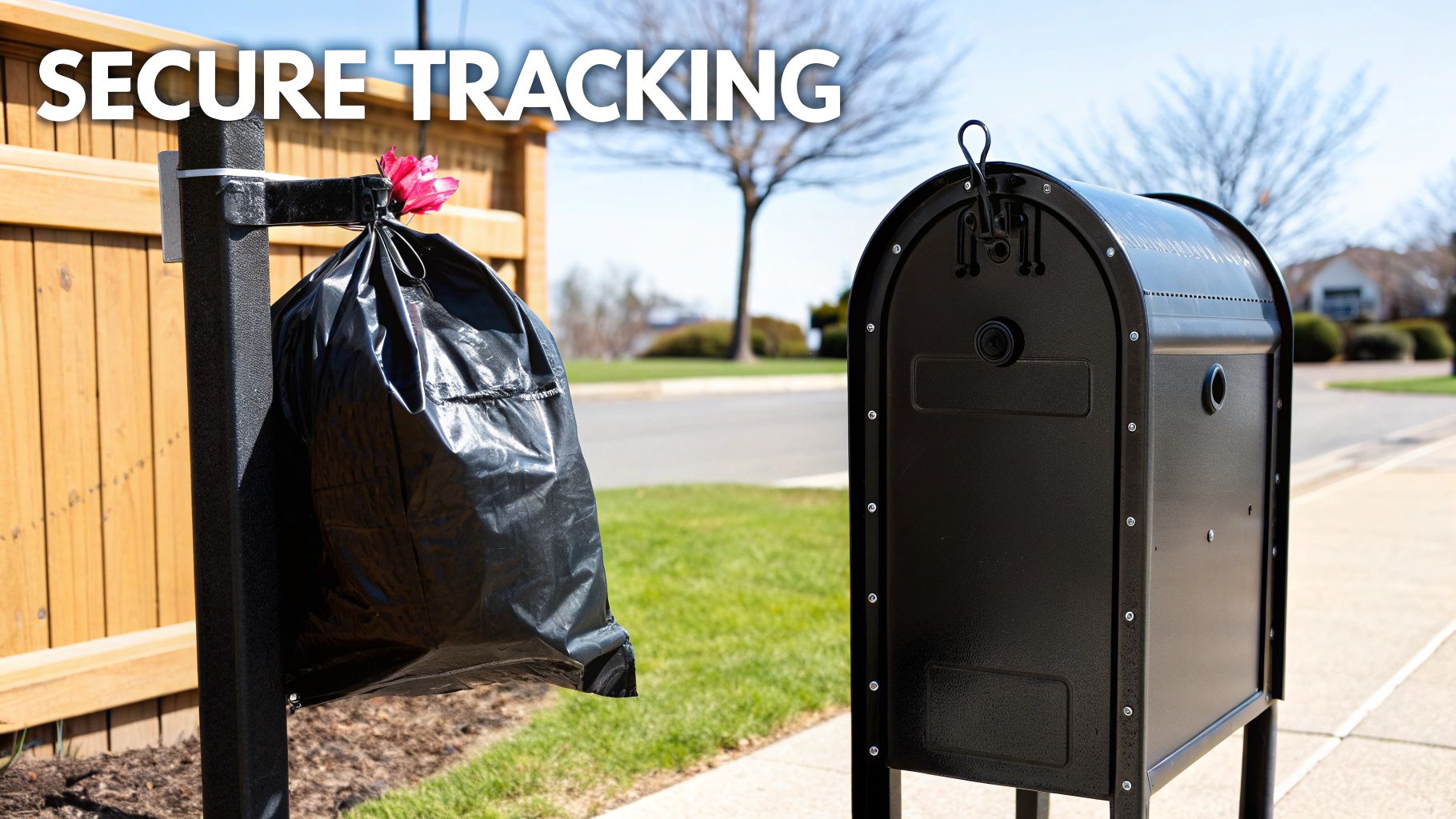
The Public Mailbox vs. The Secure Courier
Imagine the classic Meta Pixel is like a public mailbox on a busy street. When someone buys a product, their web browser is in charge of scribbling down the "purchase" event on a postcard and dropping it in that public box for Meta to pick up. The whole process happens out in the open, right on the user's device.
This old-school system is incredibly fragile. Ad blockers are like thieves who snatch the postcard before it even gets to the mailbox. Browser privacy updates, like Apple's ITP, are like a sudden rainstorm that washes the ink away, making the postcard unreadable. You're basically trusting thousands of different "mail carriers" (browsers) to do their job, and frankly, a lot of them are now designed to stop your mail from ever arriving.
The Meta Conversions API, on the other hand, is like hiring a private, armored courier.
When that same customer makes a purchase, the event is logged directly on your server—an environment you own and control. Your server then securely packages that conversion data and hands it directly to the courier (the API), who delivers it straight to Meta. This transaction is private, direct, and completely bypasses the chaos happening in the browser.
By shifting the data-sharing responsibility from the client's browser to your own server, you create a far more durable and reliable connection to Meta. It’s a direct line that can't be easily cut by the usual suspects.
Meta Pixel vs Conversions API A Side-by-Side Comparison
Looking at the two methods head-to-head really clarifies why the shift to server-side tracking has become so critical for advertisers who care about accurate attribution. The table below breaks down the core differences.
Feature | Meta Pixel (Client-Side) | Meta Conversions API (Server-Side) |
|---|---|---|
Data Origin | The user's web browser | Your website's server |
Vulnerability | High (Ad blockers, ITP, network errors) | Low (Bypasses browser-level interference) |
Data Control | Limited (Data is sent automatically) | High (You decide what data gets sent) |
Reliability | Moderate (Prone to significant data loss) | High (Direct, secure, and controlled connection) |
Data Richness | Limited to online browser events | Can include offline data (CRM, phone calls) |
As you can see, the Conversions API provides a much more robust foundation for your ad measurement.
This improved reliability is a game-changer for Meta’s ad algorithm. When it receives a cleaner, more complete dataset, it can optimize your campaigns much more effectively. For a platform like SpendOwlAI, this is absolutely essential. A steady stream of high-quality conversion data lets our system see what’s really working, allowing it to provide trustworthy recommendations instead of just reacting to the noise of incomplete data.
Not a Replacement, but a Reinforcement
One of the biggest misconceptions we see is that the Conversions API is meant to completely replace the Pixel. That’s not the goal at all. In fact, the most powerful setup uses both the Pixel and the Conversions API working together.
Think of it as having two different messengers. The Pixel is your fast-moving bike courier, great for capturing a wide range of browser interactions like button clicks and page scrolls—all valuable signals for building audiences. The Conversions API is your armored truck, making sure the most critical events, like purchases and leads, always make it through, no matter what.
Meta is built to handle this. It expects to receive events from both channels, automatically identifying duplicates (a process called deduplication) and merging them into a single, accurate conversion history. This dual approach gives you the best of both worlds: the broad reach of client-side tracking and the rock-solid reliability of server-side data.
Choosing Your Implementation Path
Alright, you're sold on the Meta Conversions API and ready to shore up your data. The big question now is: how do I actually get this thing running? The good news is you don't need a PhD in server architecture to get started. Meta has laid out a few different paths, each built for different technical comfort levels, business needs, and tech stacks.
Think of it like building a piece of furniture. You can buy it pre-assembled, get a flat-pack kit with instructions, or build it from scratch with raw lumber. Each method gets you a finished product, but the effort, cost, and level of customization are worlds apart. Your job is to pick the path that makes the most sense for your team's resources and your brand's goals.
The three main ways to get the Conversions API working are:
Partner Integrations: The simplest, "plug-and-play" route, perfect for popular e-commerce platforms.
Google Tag Manager (GTM) Server-Side: A flexible, middle-ground solution for anyone already using GTM.
Direct API Integration: The most powerful and custom option, but it requires serious developer muscle.
Let's dig into each one so you can figure out the right fit for your business.
Path 1: Partner Integrations
For most direct-to-consumer brands, especially if you're on a platform like Shopify, partner integrations are by far the fastest and easiest on-ramp to the Conversions API. These are essentially pre-built connectors that do all the heavy lifting for you, often only needing a few clicks to get going.
This is your pre-assembled furniture. You don't need to know how the joints were crafted or what tools were used—you just put it in the room and it works. The native "Facebook & Instagram" sales channel in Shopify is the classic example. It’s built to support CAPI and you can set it up in minutes right from your Shopify admin.
Who It's For:
Store owners on Shopify, BigCommerce, or WooCommerce.
Teams running lean without dedicated developers on standby.
Marketers who need a quick, reliable, "set it and forget it" solution.
Pros & Cons:
Pro: Incredibly easy and fast to set up. We're talking minutes, not weeks.
Pro: Maintained by the platform, so you don't have to worry about it breaking when Meta pushes an update.
Con: You get what you get. Customization is limited, so adding unique events or extra data parameters isn't really an option.
For most brands, this path is a no-brainer to start. It gives you a huge boost in data quality for very little effort, which is foundational if you want to understand how to scale Facebook ads without just burning cash.
Path 2: GTM Server-Side Container
What if you need a bit more control than a simple integration can offer? If you're already living and breathing inside Google Tag Manager, then setting up a GTM server-side container is a fantastic middle path. This approach shifts your tag management from the user's browser to a secure server environment that you control.
This is your flat-pack furniture kit. You get all the pieces and a clear instruction manual. You have more control over the assembly and can make a few modifications along the way, but you're still working within a pre-defined system.
Here, you configure GTM to send data to your own server container. That container then cleans up the data and forwards it directly to Meta via the Conversions API.
Who It's For:
Businesses already using Google Tag Manager for website tracking.
Marketers looking to manage multiple server-side tags (not just Meta's) all in one place.
Teams that need to track custom events or add extra data before it gets sent over to Meta.
This approach is great because it centralizes all your server-side tracking. Instead of building one-off connections for every marketing platform, you can run them all through a single GTM server container. It really cleans up your data architecture.
Path 3: Direct API Integration
The final route is the most powerful, flexible, and technically demanding: building a direct, custom integration with the Conversions API. This means your developers will be writing code on your server to format event data and send it straight to Meta.
This is the "build it from scratch" option. You’re the master carpenter, with complete control over the design, materials, and final construction. It requires real expertise, but the end result is a solution perfectly tailored to your business. This is how you send data that standard integrations could never touch, like offline conversions from your CRM or updated transaction values from subscription renewals.
Who It's For:
Larger companies with in-house engineering teams.
Businesses with complex data requirements or fully custom-built e-commerce platforms.
Brands that need to send unique conversion signals, like offline events, that aren't captured by the Pixel.
Ultimately, choosing the right path is a classic trade-off between ease and control. My advice? Start with the simplest method that checks your boxes. For most stores, a partner integration delivers 80% of the value for 20% of the effort, making it the perfect gateway into the world of server-side tracking.
You’ve done the hard work of setting up the Meta Conversions API. That’s a huge win. But this next part is where many advertisers stumble and, ironically, end up with worse data than when they started.
Here’s the trap: if you’re just blasting events from both your Pixel (the browser) and CAPI (your server) without a proper handshake between them, you’re double-counting everything. Every sale, every add-to-cart, every lead. Your ROAS will look amazing for a minute, and then you'll realize it's all a mirage.
The key to avoiding this mess is mastering event matching and deduplication. It's Meta's system for recognizing that the 'Purchase' event from a customer's browser and the 'Purchase' event from your server are the exact same transaction. Getting this right isn't just a best practice; it's the entire point of a hybrid setup.
Think of it like a detective at a crime scene. Meta sees two sets of footprints—one from the browser and one from the server. To confirm they belong to the same person, it needs matching clues. If the clues line up perfectly, Meta merges the two reports into a single, confirmed event.
The Keys to Unlocking Deduplication
So, how do we leave these clues for Meta? It all comes down to sending specific, matching parameters with every event. You need to ensure the data sent from the browser and the server for the same conversion are perfectly aligned.
The most reliable, gold-standard method hinges on two critical pieces of information:
event_name: The action itself, like 'Purchase' or 'AddToCart'. This is the easy part—just make sure they match.event_id: This is your secret weapon. It’s a completely unique ID you generate for every single conversion event. Think of it as a transaction receipt number that no other purchase will ever have.
When Meta sees a browser event and a server event with the same
event_nameand the exact sameevent_id, it knows with certainty that they are one and the same. It merges them, and you get clean, accurate data. This is the method Meta strongly recommends.
Sure, there are fallback methods. If an event_id is missing, Meta can try to piece things together using the event_name, the timestamp (event_time), and a browser cookie (fbp). But this is like trying to identify someone from a blurry photo—it's less precise and prone to mistakes. Always, always prioritize sending a unique event_id.
Boosting Your Event Match Quality Score
Deduplication stops you from overcounting, but the quality of your server data is what actually improves ad performance. Meta has a grade for this: the Event Match Quality (EMQ) score. A high score means Meta is successfully connecting your server events to real user profiles on its platform. This translates directly to better ad delivery, more accurate audience building, and a clearer picture of attribution.
So, how do you raise your grade? By packing as much high-quality customer information as possible into every server event you send. The more context you provide, the higher the chance Meta can make a match.
Here are the parameters that matter most, ranked by how much they move the needle:
High-Impact Identifiers:
Hashed Email Address (
em): This is the MVP. It’s the single most powerful matching signal you can send.Hashed Phone Number (
ph): A close second in terms of matching power.Facebook Click ID (
fbc): A parameter Meta automatically adds to your URL when someone clicks an ad. Capturing and sending this back is crucial.
Medium-Impact Identifiers:
Hashed First & Last Name (
fn,ln): Adds another layer of confirmation.Facebook Browser ID (
fbp): The cookie ID from the user's browser, great for connecting the dots.Hashed City, State, ZIP Code, and Country: Geographic data helps triangulate the user.
A quick but critical note: All personally identifiable information (PII) like emails, names, and phone numbers must be hashed using the SHA256 algorithm before you send it. This is a non-negotiable privacy requirement that turns sensitive data into a secure, scrambled string.
This diagram lays out the different ways you can get your CAPI setup running.
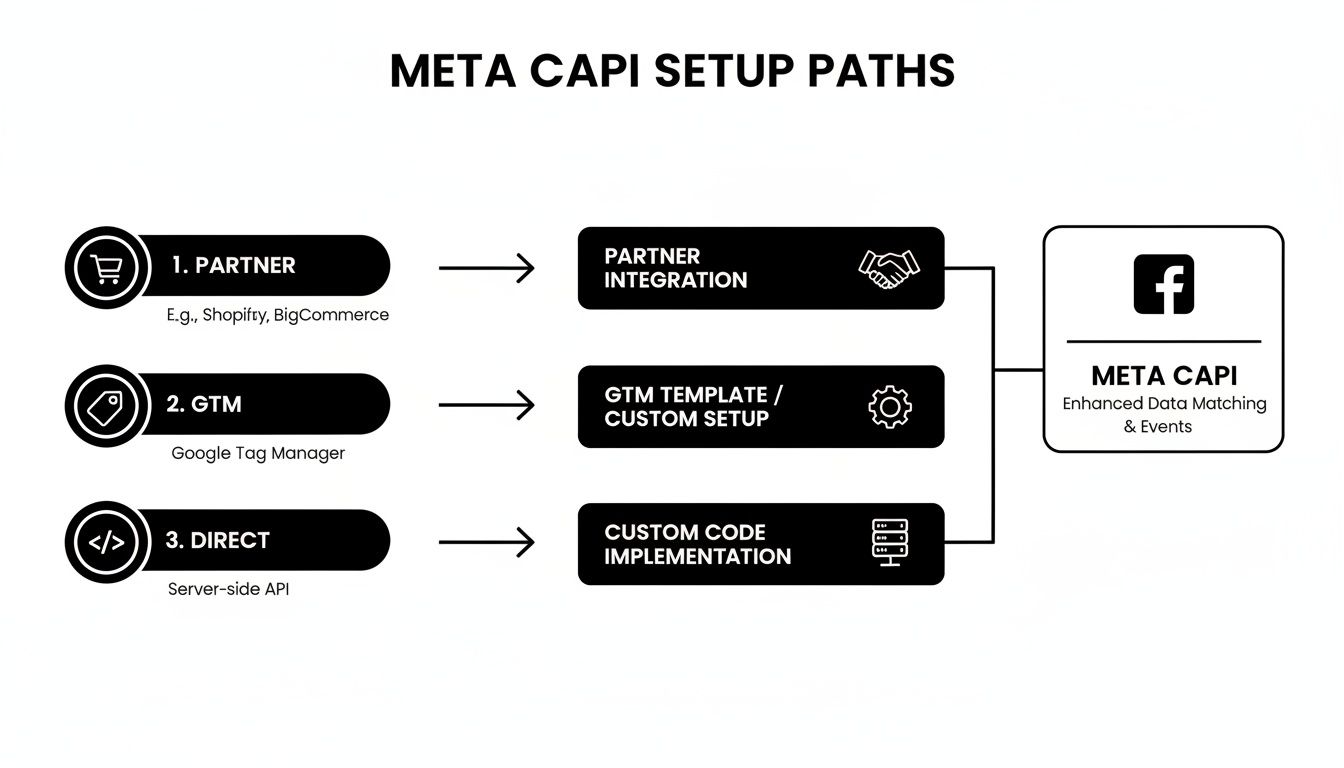
Whether you go with a simple partner integration like the one for Shopify, a Google Tag Manager server container, or a direct API build, getting these matching parameters right is what separates a successful implementation from a failed one.
A Real-World Purchase Event Example
Let's put this all together. A customer, Jane Doe, buys a pair of sneakers from your store. Here’s what a properly configured system sends to Meta:
From the Meta Pixel (Browser-side):
event_name: 'Purchase'event_id: 'JD-TXN-12345'fbp: 'fb.1.1558571054389.1098120345'
From the Conversions API (Server-side):
event_name: 'Purchase'event_id: 'JD-TXN-12345'em: The hashed version of 'jane.doe@email.com'ph: The hashed version of her phone numberfbc: 'fb.1.1554763741205.AbCdEfGhIjKlMnOp' (captured from the ad click)
See how that works? The event_name and event_id are a perfect match, so Meta instantly deduplicates them into a single, verified purchase. On top of that, the server event is loaded with high-quality hashed PII, earning a high EMQ score and feeding Meta’s algorithm the rich, reliable data it craves.
This level of precision is exactly what tools like SpendOwlAI thrive on. When you feed the system clean, verified server-side signals, it can deliver genuinely sharp, actionable insights instead of trying to make sense of noisy, incomplete data.
Measuring Real-World Performance Uplift
All the technical talk about server containers, event IDs, and data hashing is just a means to an end. The real question on every advertiser's mind is: how does this actually make me more money? A properly configured Meta Conversions API does more than just tidy up your dashboards; it tangibly improves your ad campaign performance.
This is where you connect the dots between reliable data and a healthier bottom line. When Meta's algorithm gets a richer, more complete stream of conversion signals, its ability to optimize your campaigns sharpens dramatically. You should start seeing real improvements across a few key business metrics.
Key Metrics to Monitor
Once your server-side tracking is live and stable, your focus should shift to measuring the impact. Don't just obsess over one number. You need to track a handful of related metrics to see the full picture.
Here are the primary indicators that your setup is working:
Event Match Quality (EMQ) Score: This is your report card directly from Meta. A score of "Good" or "Great" confirms that your server events are successfully being linked to user profiles—the bedrock for every other improvement.
Cost Per Acquisition (CPA): As Meta gets better at finding high-intent users, your cost to acquire a customer should go down. The algorithm simply wastes less money showing ads to people who were never going to convert anyway.
Return on Ad Spend (ROAS): With lower CPAs and more precise targeting, your overall profitability should climb. This is the ultimate measure of campaign efficiency.
Faster Learning and Smarter Delivery
One of the first things you’ll notice is how much faster your campaigns exit the dreaded learning phase. The Meta Conversions API feeds the algorithm a steady diet of high-quality data, helping it figure out who your ideal customer is in a fraction of the time. This cuts down on the budget you burn during that initial, inefficient exploratory period.
Want to dive deeper on that? We have a whole guide that explains the Facebook ads learning phase and why shortening it is so critical.
With better data, Meta's delivery system just gets smarter. It becomes much more adept at dynamic audience expansion, finding pockets of high-value users you almost certainly would have missed with Pixel-only data. This translates into more effective prospecting and a more resilient ad account that isn't so reliant on shrinking retargeting pools.
Adopting Meta's Conversions API directly correlates with measurable performance gains. For instance, while the average conversion rate for lead generation campaigns recently hit 8.78%, companies using CAPI often report substantially larger gains. Many see 15-20% uplifts in overall campaign efficiency. You can discover more insights about these performance benchmarks on hightouch.com.
This improved signal quality is exactly what a tool like SpendOwlAI thrives on. When our system analyzes data from a well-configured CAPI, the recommendations become far more accurate and impactful. We can confidently tell the difference between a genuine performance shift and simple algorithmic noise, helping you make smarter budget decisions and avoid knee-jerk reactions that hurt your campaigns.
Ultimately, a robust server-side setup doesn't just improve Meta's algorithm—it improves the entire strategic layer you build on top of it.
Your Top Meta Conversions API Questions, Answered
Alright, so you get the "what" and the "why" of the Meta Conversions API. But as soon as you start mapping out the implementation, the real-world questions start to surface. Let's tackle the most common ones I hear from brands and agencies every day.
Can I Just Use the Conversions API and Ditch the Meta Pixel?
You could, but you absolutely shouldn't. While it's technically possible to send server events to Meta without a Pixel on your site, doing so completely misses the point. It's not an either/or situation; it's a "both" situation.
Think of it this way: the Pixel is your scout on the ground, capturing all the top-of-funnel browsing behavior—page views, content views, add-to-carts. It sees everything that happens in the browser. CAPI is your reliable confirmation channel for the most important stuff, like a Purchase or Lead. It makes sure those critical bottom-funnel events get recorded, no matter what.
It's like having two security guards. One watches the front door (the Pixel) and the other guards the vault (CAPI). You need both to have a complete picture and ensure nothing gets missed. Relying on CAPI alone means you're blind to everyone who just walks in the door without going to the vault.
The whole game is about creating a redundant, resilient tracking system. Using them together is how you win.
How Do I Know If CAPI Is Actually Working?
Once you've got it set up, you can't just cross your fingers and hope for the best. You need to verify that data is flowing as expected. Thankfully, Meta makes this pretty easy inside Events Manager.
Head over to your Events Manager in Meta Business Suite.
Choose the right Pixel (your Data Source).
Click into the “Test Events” tab.
This is your mission control for testing. You can see browser events from the Pixel and server events from CAPI stream in live. The magic word you're looking for is "Deduplicated." Go through a test purchase. You should see a Purchase event fire from your Pixel and your server. If they're properly labeled as deduplicated, it means Meta is correctly merging them into a single, accurate event. That's your green light.
What’s a Good Event Match Quality Score?
Your Event Match Quality (EMQ) score is a big deal. It's a score out of 10 that tells you how well Meta can connect your server events to actual Facebook or Instagram profiles. You'll find it right in your Events Manager.
A higher score means better attribution, better optimization, and better audiences. Here’s how to read your score:
8.0 or above: Excellent. This is the goal. Your ads are getting maximum signal.
6.0 to 7.9: Good. Things are working well, but you can probably squeeze a bit more accuracy out of it.
4.0 to 5.9: Okay. This is a bit shaky. Your attribution is likely spotty, and performance is suffering because of it.
Below 4.0: Poor. This needs fixing, stat. Your server-side signals are getting lost in the void.
How do you improve it? Focus on sending more (and better) customer parameters. The heavy hitters are the hashed email address (em), phone number (ph), and the Facebook Click ID (fbc). The more of these you can reliably send with each event, the higher your score will climb.
Does CAPI Really Help with Ad Performance?
Yes, one hundred percent. This is the entire reason we go through the trouble. Better data means a smarter algorithm, which means more efficient campaigns. For any serious performance marketing team, a solid Meta Conversions API setup isn't a nice-to-have; it's foundational. It gives you the clear, reliable signal you need to make smart budget decisions, separating real trends from algorithmic noise. You can find more stats on Meta's role in performance marketing to see the broader impact.
When you get CAPI right, the results show up in your core metrics:
Lower CPA: Meta's algorithm finds your ideal customers faster and cheaper.
Higher ROAS: Your ad spend works harder because it's being shown to the right people.
Stronger Audiences: Your Custom and Lookalike Audiences are built on a complete, accurate data set.
Shorter Learning Phase: Campaigns get the data they need to optimize and exit the dreaded learning phase more quickly.
By patching the holes in your client-side tracking, you're essentially giving Meta's delivery engine high-octane fuel. The result is better performance and real business growth.
SpendOwlAI is built to turn the daily chaos of ad performance data into clear, actionable guidance. But the quality of its recommendations depends on the quality of the data you feed it. When you fuel it with the reliable, high-integrity signals from a well-tuned Conversions API, its insights become dramatically sharper. Stop guessing and start executing with confidence by checking out SpendOwlAI.