Video Size Facebook Ads: A Complete Guide (video size facebook ads)
If you're running video ads on Facebook, start with two core sizes: a 1:1 aspect ratio (square) at 1080x1080 pixels for Feeds, and a 9:16 aspect ratio (vertical) at 1080x1920 pixels for Stories and Reels. Nailing these dimensions from the get-go is the difference between an ad that looks professional and one that gets ignored.
Facebook Ads Video Specs: A Quick-Reference Guide
Getting your video dimensions right is the single most important technical step for a successful campaign. If your specs are off, you risk ugly cropping, distracting black bars, or fuzzy playback—all of which kill your ad's performance and waste your budget.
This section is built to be your definitive, scannable reference for the most critical video ad specs. As performance marketers, we know accuracy isn't just a "nice-to-have," it's essential. Using the wrong video size for Facebook ads can even cause the algorithm to penalize your ad's delivery, driving up costs and shrinking your reach. Think of this as your daily-use cheat sheet.
The visual below breaks down the three technical pillars of any Facebook video ad: aspect ratio, resolution, and video length.
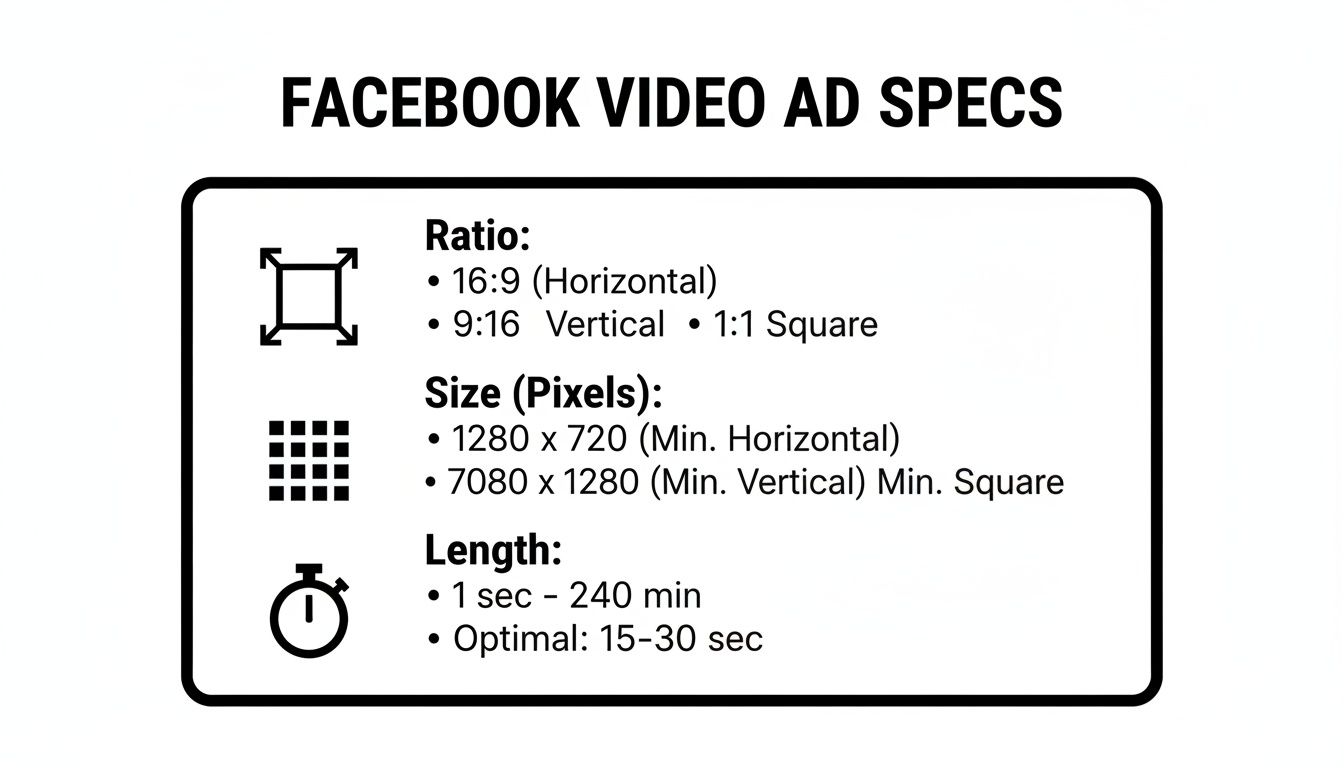
These three elements are intrinsically linked. Get them right, and your creative will look fantastic everywhere, from the main Feed to immersive full-screen placements like Reels.
Facebook Ads Video Specs Quick Reference
To make life even easier, I've put together a table summarizing the core requirements for the most common placements. Bookmark this page and use this table as your go-to resource to double-check your creative before it goes live. It's the best way to prevent common formatting mistakes.
Placement | Aspect Ratio | Recommended Resolution (Pixels) | Max File Size | Max Length |
|---|---|---|---|---|
Feed | 1:1 or 4:5 | 1080 x 1080 or 1080 x 1350 | 4GB | 240 minutes |
Stories | 9:16 | 1080 x 1920 | 4GB | 2 minutes |
Reels | 9:16 | 1080 x 1920 | 4GB | No max limit |
In-Stream | 16:9 or 1:1 | 1920 x 1080 or 1080 x 1080 | 4GB | 5-15 seconds |
Carousel | 1:1 | 1080 x 1080 | 4GB | 2 minutes |
While some placements have extremely long maximum lengths (like 240 minutes for Feed), remember that's a technical limit, not a best practice. The most effective video ads are almost always much shorter and punchier. We'll dive into placement-specific best practices later in this guide.
Why Ad Sizing Is Critical for Campaign Performance
Getting your video size for Facebook ads right is far more than a technical checkbox; it's one of the most fundamental levers you can pull for campaign success. Your specs directly impact core performance metrics like Return on Ad Spend (ROAS), Click-Through Rate (CTR), and ultimately, what you pay to acquire a customer. Botching this from the start can sink an otherwise brilliant creative concept.
We’ve all seen it: a video clearly made for a 16:9 YouTube screen crammed into a 9:16 Stories placement. It either gets awkwardly cropped or shows up with those jarring black bars. This doesn't just look sloppy—it instantly signals to a user that the ad doesn't belong, breaking the native feel of the platform and giving them every reason to just keep scrolling.
The Impact on User Experience and Ad Costs
When your video is pixelated, stretched, or poorly cropped, the user experience is the first thing to suffer. That friction is a red flag for the Meta algorithm, which interprets the poor engagement as a low-quality ad.
As a result, you'll see the platform start to penalize your ad's delivery. This usually shows up in your metrics as:
Higher Cost Per Mille (CPM): You're forced to pay more just to reach the same number of people because the algorithm sees your ad as less relevant.
Lower Click-Through Rates (CTR): An ad that looks out of place is far less likely to grab someone's attention and earn the click.
Increased Cost Per Acquisition (CPA): When clicks are down and costs are up, acquiring each new customer becomes a much more expensive ordeal.
A poorly sized video isn't just a creative issue; it's a financial one. The algorithm rewards ads that fit seamlessly into the user experience, and proper sizing is the first step to achieving that seamlessness.
For any performance-focused team, mastering these details is non-negotiable. It ensures your creative is judged on its actual merit—the message, the offer, the visuals—instead of being dragged down by a technical mistake you could have easily avoided. These flaws can completely skew your performance data, making it impossible to know what's truly working. You can learn more about how small details affect campaign outcomes in our complete guide on how to scale Facebook ads.
Preventing Ad Rejection and Wasted Spend
Beyond just hurting your performance, the wrong specs can get your ad rejected outright. Meta's automated review system is built to check for compliance with its technical guidelines. If you try to upload a video that's over the 4GB file size limit or uses an unsupported format, your ad will be disapproved before it ever has a chance to run, delaying your entire launch.
Ultimately, every dollar you put behind a badly optimized ad is partially wasted. The throttled performance means you're never getting the full value from your budget. By making sure every video size for Facebook ads is perfectly dialed in for its placement, you establish a baseline of quality that gives your campaigns the best possible chance to succeed. It's this kind of attention to detail that separates the amateur efforts from the professional, high-ROAS campaigns.
Video Ad Specifications for Facebook Feed
The Facebook Feed is the original, prime real estate for advertisers, but that also makes it one of the most competitive spots on the platform. If you want any chance of stopping the scroll, your video ads have to be formatted perfectly to grab attention and feel native to the user's experience. Nailing the video size for Facebook ads in this placement is your first, most critical step toward a successful campaign.
Unlike the full-screen immersion of Stories or Reels, the Feed is built for square and slightly taller vertical videos. These formats are specifically designed to take up as much screen space as possible on mobile, pushing competing organic posts out of view and locking all the focus on your message.
Core Aspect Ratios and Resolutions
When it comes to the Facebook Feed, you've got two main aspect ratios to work with. Both are highly effective, and your choice really comes down to your creative assets and how you want them to fill the screen.
1:1 (Square): This is the classic, go-to ratio that’s compatible everywhere. Stick to a resolution of 1080x1080 pixels. It's the industry standard for a reason—it provides a clean, balanced look that performs well on both mobile and desktop.
4:5 (Vertical): This mobile-first ratio gives you a taller frame, taking up even more valuable screen real estate. The recommended resolution is 1080x1350 pixels. That extra vertical space is fantastic for showing off products or creating more immersive scenes.
While both formats are solid, the 4:5 ratio gives you a slight edge on mobile simply by maximizing your visual footprint. Whichever you pick, make sure your video’s shortest side is at least 1080 pixels to keep it looking sharp. Getting these specs right is crucial; the platform will automatically crop anything that doesn't fit, which can easily cut off key parts of your ad and kill its impact.
Technical File Requirements
Beyond the dimensions, your video file itself has to meet a few technical standards to avoid upload errors or delivery problems. These requirements ensure your ad plays smoothly for everyone, no matter their device or internet connection.
Here are the key technical specs to keep in mind:
Maximum File Size: Your video can't be larger than 4GB.
Recommended Formats: While Facebook accepts a bunch of formats, MP4 and MOV are by far the most reliable and widely used. Stick with them.
Minimum Dimensions: The absolute smallest you can go is 120x120 pixels, but honestly, that's far too low for a quality ad. Always aim for the recommended 1080p resolutions.
For Feed video ads, exceeding the 4GB file size or using incorrect dimensions can cause ad rejection or poor rendering, which spikes costs and hurts ROAS. In practice, vertical formats shine; 9:16 Reels-style videos can boost CTR by 35% over other formats, while those with sound may deliver 12% higher conversion rates. Short clips under 15 seconds often see 23% higher completion rates, and mobile video ads in this range can cut cost per acquisition by 12.3%. Discover more insights about these Facebook ad statistics on Sprout Social.
Best Practices for Feed Video Ads
To really make an impact in the Feed, getting the technical specs right is just the start. The best-performing ads also lean into creative best practices designed to capture and hold attention in those first critical seconds.
Your number one goal is to make an immediate impression. This means your thumbnail needs to be compelling and the very first frame of your video has to be visually arresting. Since most people browse with the sound off, burned-in captions are completely non-negotiable. For a deeper look at winning strategies, check out our guide on how to optimise Facebook ads.
Finally, keep it brief. Even though the technical limit is a whopping 240 minutes, the most effective Feed ads are almost always under a minute long, with the core value proposition delivered in the first 15 seconds.
Getting Video Ads Right for Stories and Reels
Stories and Reels are a completely different ballgame compared to the Feed. These placements are all about a full-screen, vertical, and incredibly fast-paced experience. If your ad doesn't look and feel native to this environment, it will stick out like a sore thumb, earning you instant skips and torching your budget. Nailing the video size for Facebook ads here is absolutely essential.
The number one rule for Stories and Reels is to go vertical. Full screen or nothing. Any other format leads to those dreaded black bars or weird cropping, which immediately screams "this is an ad that doesn't belong here" to anyone watching.
The Non-Negotiable 9:16 Aspect Ratio
For both Facebook Stories and Reels, the only aspect ratio that matters is 9:16. This is the standard vertical format designed to take over the entire mobile screen, which is exactly what you want for maximum impact.
To keep things looking sharp, your video resolution should be at least 1080x1920 pixels. Anything less risks looking pixelated or blurry, especially on newer devices. Sticking to these dimensions is your first step toward creating ads that blend in seamlessly with organic content.
Technical Specs and Length Limitations
While they look the same, there are some subtle technical differences between Stories and Reels ads. Both placements allow a hefty max file size of 4GB and prefer the usual MP4 or MOV formats.
The main difference comes down to how long your video can be:
Facebook Stories: You can run a video ad up to 2 minutes long. Be aware, though, that anything over 10 seconds might get automatically chopped into separate Story cards.
Facebook Reels: This placement is much more forgiving and currently has no maximum length limit for video ads. That said, shorter and punchier is almost always the way to go.
For the best results, aim to keep your Stories and Reels ads under 15 seconds. This matches how people actually use these platforms and makes sure you get your point across before they swipe on to the next thing.
Watch Out for the UI Safe Zones
One of the easiest mistakes to make with full-screen ads is forgetting about the "safe zone." The app's interface—your profile name, the caption, and the call-to-action button—is overlaid directly on top of your video. You have to design around it.
As a solid rule of thumb, keep your logos, critical text, and key product shots out of the top 15% and bottom 15% of the screen. This space is reserved for the UI. The absolute best way to double-check your work is to use the ad preview tool inside Meta Ads Manager. It shows you precisely how your ad will render on different devices, helping you catch any costly design flaws before you go live.
Video Specs for In-Stream and Other Placements
While the Feed and Stories get most of the attention, you can find some serious reach in other spots like In-Stream, Marketplace, and the Facebook Audience Network. But don't just assume your Feed-ready creative will work everywhere else. Each of these placements has its own set of rules and user expectations.
Getting the video size for Facebook ads right in these secondary spots is crucial. A video that’s perfect for the Feed can look cropped and out of place as an In-Stream ad, which is a dead giveaway to users that they’re seeing a generic ad that doesn't belong. Nailing the specs ensures a smooth user experience, not a jarring interruption.
Facebook In-Stream Video Ads
In-Stream ads are the closest thing Facebook has to a classic TV commercial. They pop up during videos from other creators and publishers, interrupting content that someone has actively chosen to watch. For this reason, your ad needs to be quick, engaging, and straight to the point.
You've got a couple of options for aspect ratios, which gives you some flexibility.
16:9 (Horizontal): This is your standard widescreen format, best at 1920x1080 pixels. It's a great fit if you're repurposing content originally shot for platforms like YouTube.
1:1 (Square): A solid, mobile-friendly choice at 1080x1080 pixels. Square video takes up a good amount of screen real estate on both mobile and desktop.
The biggest thing to watch with In-Stream is the video length. On desktop, you’re limited to a tight window of 5 to 15 seconds. Mobile is more forgiving, allowing anything from 5 seconds up to 10 minutes, but let's be realistic—shorter is almost always going to perform better.
Marketplace and Audience Network Specs
People think of Facebook Marketplace as a place for static C2C listings, but it’s also a powerful ad placement. Because users are in a shopping mindset, your creative needs to be direct and show the product clearly.
For Marketplace, you'll want to stick with a 1:1 aspect ratio and a 1080x1080 pixel resolution. This square format looks native next to the other product listings, helping your ad blend in seamlessly while users are browsing.
The Audience Network is a whole different beast. It pushes your ads out to thousands of third-party apps and websites, offering huge potential scale. To make sure your ad looks good across this massive, unpredictable inventory, the 9:16 vertical format (1080x1920 pixels) is your best bet. It’s built for the full-screen mobile experience and adapts well to just about any app environment.
Technical Requirements and Recommended Export Settings
You can get the dimensions perfect, but if your export settings are off, the ad will still flop. A lot of the time, when we see pixelated videos, out-of-sync audio, or ads that Meta just plain rejects, it’s not the sizing—it’s the technical details under the hood. Nailing these settings is how you make sure the ad looks as good on someone's phone as it did in your editing software.
Think of your video file as a specialized container. How you package the visual and audio data inside that container during export dictates how it gets delivered and played back. Getting the packaging right is crucial for a smooth experience across the billions of different devices on Meta's network.
Video Compression and Format
For virtually any video size Facebook ads you're making, your go-to format should be MP4. Meta also accepts MOV files, but MP4 gives you the best balance of quality, file size, and compatibility across the board.
Inside that MP4 container, the video itself needs to be compressed. The standard here is H.264 video compression, sometimes called Advanced Video Coding (AVC). It's the workhorse of web video for a good reason: it keeps file sizes small without sacrificing too much visual quality. This means your ads load faster and play without buffering, even for users on slower connections.
Audio Encoding Standards
Don't sleep on the audio. Even if many users start watching with the sound off, bad audio quality instantly makes an ad feel cheap and unprofessional when they do turn it on.
Here are the key settings to get right:
Audio Codec: Stick with AAC (Advanced Audio Coding). It’s the standard partner for H.264 video.
Sample Rate: A sample rate of 44.1 kHz is the sweet spot for high-quality sound.
Bitrate: You should aim for an audio bitrate of 128kbps or higher. Anything less and the audio starts to sound tinny and compressed.
These specs will make sure your audio is crisp and clear, delivering a much better experience for anyone who taps to listen.
Frame Rate and Scan Type
Choppy, jittery motion looks amateurish and can completely distract from your message. This is almost always caused by a mismatch in frame rate settings.
To prevent any weird playback issues, always export your video with a fixed frame rate—never variable. 30 frames per second (fps) is the standard for most digital video, so aim for that. Also, make sure your video uses progressive scan, not interlaced, to avoid ugly motion artifacts on modern screens.
Finally, keep an eye on your file size. The maximum for almost every ad placement is 4GB. If you find your file is too large, you'll need to either dial up the compression (which can reduce quality) or simply trim the video's length. Following these technical guidelines is the last, critical step to ensuring your video ad looks and sounds exactly the way you planned.
Common Questions About Facebook Ad Video Sizes
Even with a comprehensive spec sheet in hand, a few common questions always seem to pop up when you're in the final stages of prepping a video ad. Let's tackle some of the most frequent points of confusion I see with performance teams. Getting these details right is the difference between a high-performing creative and a costly mistake.
So, what happens if you upload a video with the wrong aspect ratio? Facebook doesn't reject it, but its "fix" is often worse. The system will automatically crop your video or add black bars to make it fit, which almost always looks unprofessional and can cut off crucial text or visuals, killing your engagement.
Which Video Format Is Best?
You'll see that Meta officially accepts both MP4 and MOV files, but for my money, MP4 is the gold standard for every ad placement. When you encode an MP4 with H.264 video compression, you get the perfect blend of high quality and small file size.
This means your ads load faster and play without a hitch, whether someone's on a lightning-fast Wi-Fi connection or spotty mobile data. While MOV files work just fine, MP4 is the universal language of web video, making it the most reliable and compatible choice for advertisers.
How to Find Ad Safe Zones
One of the trickiest parts of designing for immersive, full-screen placements like Stories and Reels is working around the user interface. You have to account for the profile info, caption text, and call-to-action buttons that will inevitably cover parts of your creative.
The best way to see exactly where these "safe zones" are is to use the ad preview tool right inside Meta Ads Manager. It gives you a pixel-perfect preview for every placement. As a solid rule of thumb, always keep your most important text and logos out of the top and bottom 15% of the screen. For more tips on how creative edits can affect your campaigns, it's worth understanding the Facebook ads learning phase and how to navigate it.
Instead of guessing which ads need your attention, let SpendOwlAI tell you. Our platform delivers a clear, prioritized list of daily actions based on real performance data, helping you optimize budgets, creatives, and audiences with confidence. Start your free 7-day trial today.