Mastering Retargeting Ads on Facebook That Actually Convert
Let’s talk about retargeting. If you've ever felt like your ads are just shouting into the void, retargeting is the answer. It’s all about reconnecting with people who’ve already checked you out—they’ve visited your site, looked at a product, or even started to buy something.
This isn’t just another tactic; it’s a strategy built on a simple, powerful truth. You're focusing your ad spend on a "warm" audience that already knows who you are. The result? Way higher conversion rates and a much better return on your ad spend (ROAS).
Why Retargeting Is Your Most Powerful Advertising Tool
If you have to choose just one place to put your advertising dollars, this is it. Forget chasing down complete strangers for a minute and focus on the people who are already familiar with your brand. Think about it: it's always easier to persuade someone who's already interested than to start a conversation from scratch. This isn't just a hunch; it's a core principle of smart advertising, and the data backs it up.
Now, that doesn't mean you should stop looking for new customers. Prospecting is vital for long-term growth. But retargeting is where you stop leaving money on the table. These are people who have effectively raised their hand by browsing your products, watching your videos, or ditching a shopping cart. Not following up is like watching a customer wander out of your shop without even asking if they found what they were looking for.
The Performance Gap: It's Wider Than You Think
The difference in performance between a cold audience and a warm, retargeted one isn't just a small gap—it's a canyon. The best ad platforms are designed to spot these high-intent users and help you turn their initial interest into actual sales. The numbers don't lie, and for any serious performance marketer, prioritizing this audience is non-negotiable.
Benchmarks across the industry show that retargeting ads on Facebook consistently outperform prospecting campaigns by a huge margin. It's common to see a ROAS of 3x to 10x (or even higher) from a retargeting audience, while cold traffic often struggles to break even at 1x-2x. Click-through rates (CTR) tell a similar story, often hitting 2%-5% for retargeting, which completely overshadows the typical sub-1% you see with new user campaigns. You can explore more data on retargeting performance to see just how effective this can be.
Here's the stat that really matters: retargeted visitors are a whopping 70% more likely to convert and complete a purchase.
Putting It Into Practice
This data isn't just abstract. It translates directly into more efficient ad spend and bigger profits. I saw this firsthand with a SaaS client. We set up segmented retargeting campaigns targeting users who took high-intent actions, like visiting the pricing page. The result was a 345% increase in conversions while cutting the cost per marketing qualified lead (MQL) in half.
For anyone running a DTC brand or a Shopify store, this means:
Less Wasted Spend: Your budget is focused on people already moving down your funnel.
Faster Conversions: You close the gap between a user's first visit and their final purchase.
Better ROAS: Every dollar you put in works that much harder, which is great for your bottom line.
By making retargeting a priority, you move beyond just acquiring new customers. You start building a complete system that not only finds new people but also gets incredibly good at guiding interested ones across the finish line.
Setting Up Tracking for Data You Can Actually Trust
Every powerful retargeting campaign I've ever built started with one thing: clean, reliable data. If your tracking is sloppy, you're just guessing who to show your ads to. That's a surefire way to waste money and leave sales on the table.
Your foundation for effective retargeting ads on Facebook is built on two key pieces of tech working in tandem: the Meta Pixel and the Conversions API (CAPI). Let me be clear—this isn't an either/or choice. You absolutely need both.
The Pixel is a snippet of code on your website that tracks user actions from their browser. It's great for capturing a wide range of on-site events.
But the Pixel alone just doesn't cut it anymore. With the rise of ad blockers and major privacy shifts like Apple's iOS 14 updates, a lot of that browser data simply gets lost in transit. This is exactly why the Conversions API is now essential.
Why You Need Both Pixel and CAPI
CAPI sends data directly from your server to Meta's. This creates a much more stable and dependable connection that isn't affected by browser-level issues. Think of it as a secure, direct line for your most critical conversion data, giving you a far more complete picture of what’s actually happening.
Running both is non-negotiable for accurate attribution and building robust retargeting audiences. We've put together a deep dive on this, so for the technical nitty-gritty, check out our complete guide on the Meta Conversions API.
This infographic really nails the difference between yelling into the void with cold ads versus having a conversation with people who already know you.
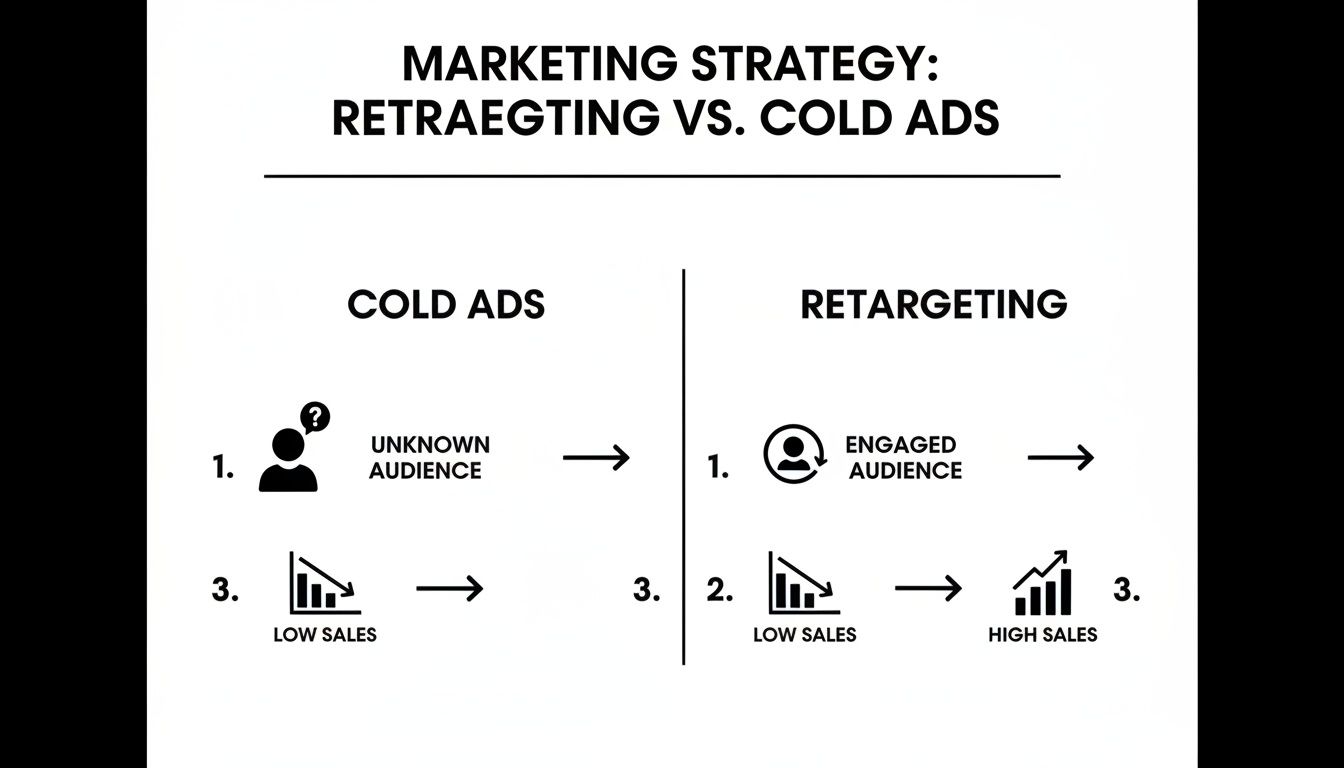
As you can see, retargeting focuses your ad spend on an audience that's already shown interest, which is why it so often leads to a higher conversion rate.
Implementing Essential Tracking Events
To make this data useful, you need to tell Meta what specific user actions, or "standard events," to look for. While there are many options, a few are absolutely critical for any e-commerce or lead-gen business.
These are the events you need to prioritize setting up:
ViewContent: This fires when someone looks at a specific product or landing page. It’s your first signal of what they’re interested in.
AddToCart: A user adding an item to their cart is a huge buying signal. You can't afford to miss this.
InitiateCheckout: This tracks users who have taken that next big step and started the checkout process—a prime audience for retargeting.
Purchase: The finish line. This event confirms a successful conversion and captures crucial transaction data.
Pro Tip: Don't just set it and forget it. Verifying your setup is just as important as the implementation itself. Jump into Meta's Events Manager to test your events and diagnose any problems. Getting the data right from day one is the bedrock of building Custom Audiences that actually convert.
By properly setting up and verifying these key events through both the Pixel and CAPI, you're making sure the data fueling your campaigns is as accurate as it can be. This SKU-level clarity is what unlocks the ability to build the hyper-segmented, high-intent audiences that drive incredible results.
Building High-Intent Audiences That Drive Action

Now that your tracking is solid, it's time to build the audiences that actually move the needle. The single biggest mistake I see with retargeting ads on Facebook is the "one giant bucket" approach—lumping every single person who ever visited your site into one audience.
That's like treating a first-time window shopper the same as a customer who abandoned a full cart. It's lazy, it's ineffective, and it wastes money.
Real success in retargeting comes from thoughtful segmentation. We're going to create distinct Custom Audiences based on the actions people took, which tells us how interested they really are. This lets you tailor your message, your offer, and your timing to give them the nudge they need to take the next step.
Start with Broad Engagement Audiences
Think of this as your foundational layer. This group includes people who've shown some initial interest but haven't signaled they're ready to buy just yet. They're valuable, but you can't hit them with a hard sell right out of the gate.
I always start with these two essential broad audiences:
All Website Visitors (Last 30 Days): This is your widest net. The goal here is simple: brand recall. You're just trying to stay top-of-mind, not push for an immediate sale.
Facebook & Instagram Engagers (Last 90 Days): This audience is made up of anyone who liked, commented, shared, or saved one of your posts. They know who you are but might not have even visited your website. A gentle nudge to check out your latest collection or a popular blog post works wonders here.
A quick note on timing: don't get carried away with long lookback windows. A 180-day website visitor audience is usually full of stale leads who have long forgotten you. Stick to the last 30 to 90 days to keep your targeting sharp and relevant.
Isolate Your High-Intent Segments
Okay, this is where the magic happens. These are the audiences that generate the most revenue because their actions tell us they are very close to buying. By isolating them, we can hit them with more direct, persuasive ads designed to get them over the finish line.
My go-to high-intent segments are non-negotiable for any e-commerce brand:
Product Page Viewers (Last 14 Days): These folks are actively comparison shopping. Now is the time to hit them with Dynamic Product Ads (DPAs) to show them the exact product they were just looking at.
Add to Cart (Last 7 Days): This is your money audience. They are on the verge of converting, so you need to act fast. A little urgency, maybe a reminder about what they left behind, is the key.
Initiate Checkout (Last 3 Days): These are the hottest leads you have, short of actual buyers. They stumbled at the very last step. Your ad should be all about reassurance—highlighting secure checkout, fast shipping, or even a small incentive to complete the purchase.
A critical rule for these high-intent groups is to exclude recent purchasers. Nothing annoys a new customer more than seeing an ad for the product they just bought, especially if it’s suddenly on sale. Always use audience exclusions to keep your campaigns sharp and your customers happy.
To help you organize this, here's a quick breakdown of how I structure these core segments.
Key Retargeting Audience Segments and Strategies
Audience Segment | Defining Action | Exclusion Window | Recommended Ad Creative/Offer |
|---|---|---|---|
Product Viewers |
| Last 14 days | Dynamic Product Ad (DPA) of the viewed item; social proof. |
Cart Abandoners |
| Last 7 days | DPA carousel of cart items; gentle reminder; "selling out fast" urgency. |
Checkout Abandoners |
| Last 3 days | Single image/video ad reinforcing trust (secure checkout, reviews); small incentive. |
Past Purchasers |
| Last 180 days | Cross-sells (e.g., "Pairs well with..."); new product announcements; loyalty offers. |
This table isn't just a suggestion—it's a proven blueprint for turning intent into revenue by matching the right message to the right person at the right time.
Build Audiences for Retention and Loyalty
Your work isn't done after the first purchase. In fact, it's just beginning. Your existing customers are your most valuable asset, and retargeting them is all about increasing their lifetime value (LTV) and turning them into loyal fans.
You wouldn't show a first-time visitor ad to a repeat buyer, would you? Create a dedicated audience just for them.
Past Purchasers (Last 180 Days): This is your LTV-boosting audience. Show them complementary products, announce new arrivals before anyone else, or offer them exclusive "thank you" discounts. You can get even more advanced by segmenting this group by purchase frequency or average order value.
By segmenting your audiences this thoughtfully, you stop blasting people with random ads and start having intelligent, sequential conversations. You’re guiding each person from mild curiosity to a confident purchase and, hopefully, into a long-term brand advocate. This is how you build a real marketing machine.
Creating Ads That Re-Engage and Convert
Okay, your audiences are segmented and the tracking is locked in. Now we get to the fun part—the ads your customers actually see.
Crafting ads for a warm audience is a totally different game than prospecting. These folks already know who you are. Your job isn't to introduce your brand; it's to give them a compelling nudge to come back and finish what they started. This ad is your final conversation before they pull the trigger, so it needs to be relevant and persuasive enough to overcome any last-minute hesitation.
Harnessing the Power of Dynamic Product Ads
For anyone in e-commerce, Dynamic Product Ads (DPAs) are your absolute best friend in retargeting. It's not even a debate. These ads are pure magic, automatically showing people the exact products they just viewed or added to their cart.
This is personalization at scale. Instead of a generic brand ad, you can pop back into their feed with that specific pair of sneakers they were eyeing. That level of direct relevance is incredibly powerful. DPAs do the heavy lifting for you, delivering a hyper-personalized ad that almost always leads to a better click-through rate and, ultimately, more sales. Of course, to make them truly shine, you’ll want to pair them with great copy and visuals and learn how to improve your click-through rate.
Moving Beyond the Product Grid
While DPAs are the engine of your retargeting machine, they can't be the only thing you run. A smart strategy layers in other types of creative to build trust and knock down the barriers that stopped someone from buying in the first place.
Here are a few high-impact creative angles I always use for retargeting ads on Facebook:
User-Generated Content (UGC): Get real customers in your ads. Authentic photos and videos of people loving your products are infinitely more believable than your slickest brand creative.
Testimonials and Reviews: Pull your best five-star reviews and turn them into simple, eye-catching graphics. Highlighting specific praise about quality or customer service can be the exact piece of social proof someone needed to see.
Benefit-Focused Videos: Don't just show the product, show the result. Create short, punchy videos that demonstrate how your product solves a problem or makes life better. Focus on the feeling.
The key is to tell a story over time. A user might first see a DPA with the product they viewed. A few days later, they see a video testimonial about that same product. Then, they get hit with an ad for a limited-time discount. This is creative sequencing, and it guides the user toward a purchase without them feeling like they're being hammered by the same ad.
Managing Creative Fatigue and Frequency
The biggest killer of a retargeting campaign is creative fatigue. It’s inevitable. When your audience sees the same ad again and again, they start to ignore it. Performance plummets, and you're just burning cash.
As a rule of thumb, I always aim to have 3-5 unique ad creatives running within each retargeting ad set. You have to plan on refreshing these every two to three weeks, especially if you notice performance starting to slide.
You also need to obsessively watch your frequency metric—the average number of times each person has seen your ad. Once this number starts creeping up past 5-7 in a short window, you’re hitting the point of saturation. It’s a huge red flag. Use Facebook’s frequency capping options to put a lid on it. The goal is to re-engage, not annoy, your best potential customers.
Managing Your Budget and Bids Like a Pro
You can have the most dialed-in audiences and eye-catching creative, but if your budgeting and bidding strategy is a mess, none of it matters. This is where so many operators stumble, making reactive, emotional decisions that do more harm than good. Getting your budget right for retargeting ads on Facebook is about trusting the system and letting data—not panic—call the shots.
A common crossroads is picking the right bid strategy. You’ll mainly be choosing between 'Lowest Cost' (often called 'Highest Volume' now) and 'Cost Cap.'
'Lowest Cost' is pretty straightforward: it tells Facebook to get you the most conversions it can within your budget. This is my go-to starting point for most retargeting campaigns. It lets the algorithm explore and helps you establish a baseline for what a realistic cost per acquisition (CPA) actually looks like.
'Cost Cap,' on the other hand, gives you more control by setting a ceiling on the average cost you're willing to pay per result. The upside is predictable costs, but the risk is setting your cap too low, which can starve your campaign of delivery. My advice? Start with 'Lowest Cost' to get your bearings. Once you have a week or two of solid CPA data, you can test a 'Cost Cap' to lock in that profitability as you start to scale up.
Patience Is Your Greatest Asset
The cardinal sin of managing ad accounts is constant tinkering. Facebook's algorithm thrives on data and time, and every time you nervously tweak a budget or bid, you're essentially hitting the reset button. This keeps you trapped in a cycle of volatility. It’s especially critical to keep your hands off after you’ve exited the initial learning phase, which you can learn more about managing the Facebook ads learning phase in our deep-dive guide.
Seriously, give your campaigns at least 3-5 days to find their footing after any significant change before you even think about touching them again. Judge performance over a full week, not just a few hours.
Setting Realistic Performance Targets
The beauty of retargeting is its raw efficiency. One of the most powerful advantages of Facebook retargeting is its knack for slashing cost per acquisition (CPA) by 40–70% compared to prospecting campaigns. For performance marketers, that's huge.
In my own experience with B2B SaaS clients, a well-structured retargeting funnel consistently brings in qualified leads for 40-60% less than our cold traffic campaigns. It even beats Google retargeting by 20-30% in most cases, simply because the engagement signals on Facebook are so much richer. You can discover more insights about Facebook ads statistics and dig into the data yourself.
Key Takeaway: Your retargeting CPA should be dramatically lower than your prospecting CPA. If it’s not, that’s a massive red flag. It tells you something is broken in your audience segmentation, creative, or offer.
When it comes time to scale, think slow and steady. A solid rule of thumb is to increase your budget by no more than 20% every 2-3 days. This gradual approach keeps the algorithm happy, preventing performance shocks and allowing you to scale up responsibly without derailing your results.
Sidestepping the Classic Retargeting Blunders
I’ve seen it happen more times than I can count. Even sharp, experienced marketers get tripped up by the same few retargeting mistakes. They're subtle, easy to make, and they quietly bleed your budget dry while leaving you scratching your head about why performance is tanking. Let's walk through these common traps so you can avoid them from the get-go.
One of the biggest culprits is audience overlap. This is a classic self-sabotage move where your broad, top-of-funnel campaigns are accidentally competing with your laser-focused retargeting ads for the exact same person. You end up in a bidding war with yourself, which inflates your costs and makes your attribution a complete mess. The fix is simple but crucial: always, always use audience exclusions to keep your funnels separate.
Another one that drives customers crazy is seeing an ad for something they just bought. It’s a terrible post-purchase experience, and it's even worse if the ad is offering a discount they just missed out on. It just looks sloppy. Make sure you have an exclusion audience for recent purchasers (say, the last 30 days) and apply it to every retargeting ad set that isn't specifically designed for cross-selling or upselling.
Setting Up Smart Guardrails
Getting your audience windows wrong is another easy way to waste money. Sure, a 180-day window for website visitors sounds great for maximizing reach, but let's be real—someone who clicked on your site six months ago has long forgotten you. Their intent is gone.
On the flip side, a tiny 1-day window for cart abandoners is often too narrow and you'll miss people who just needed a night to think it over. You need a balanced approach.
Here are some solid starting points I use as a rule of thumb:
Website Visitors: A 14-30 day window usually keeps the audience fresh and relevant.
Product Viewers: These folks are actively shopping around. Hit them in the 7-14 day sweet spot.
Cart Abandoners: Their intent is red-hot, but it cools fast. A 3-7 day window is perfect for nudging them over the finish line.
The last mistake is probably the most tempting: over-managing your campaigns. We’ve all been there. You see one bad day of performance and immediately want to start pulling levers—tweaking bids, swapping creative, slashing budgets. This knee-jerk reaction is the enemy of the algorithm. It resets the learning phase and throws the campaign into a volatile loop. You have to resist that urge. Give it 3-5 days to see a real trend before you make any changes.
Sticking to these principles will help you dodge the most common and costly errors. It's about building a resilient, effective retargeting machine that actually works.
Stop wasting time on noisy data and start making smarter decisions. SpendOwlAI gives you clear, prioritized actions to improve your ad performance on Meta and Google every single day. See what to change and what to leave alone by starting your free trial at https://spendowlai.com.