Meta Catalog Ads: A Guide to Profitable Scale in 2026
You launched meta catalog ads because they promised scale. Upload the feed, connect the pixel, let Meta match products to people, and sales should follow.
Then the account settles into a pattern that looks productive but isn't. A handful of products spend every day. The rest of the catalog barely serves. ROAS looks acceptable in the ad account, but finance doesn't see the same story in contribution margin. Teams keep tweaking audiences and creatives while the core problem sits in the feed and product set logic.
That’s the gap between running catalog ads and running them profitably. At small scale, you can sometimes get away with a messy setup. Once the catalog gets wider, the waste compounds fast. What matters isn't just whether Meta can serve products. What matters is whether you've told Meta which products deserve budget, which audiences should see them, and when those products should stop receiving distribution.
Why Your Meta Catalog Ads Are Underperforming
The most common failure pattern is simple. A brand syncs its Shopify catalog into Meta, creates one broad catalog campaign, and lets the algorithm choose winners.
Meta does choose winners. The problem is that it often chooses the products that are easiest to click and easiest to convert, not the products that are best for the business. In catalogs with any meaningful SKU count, that usually means the same few bestsellers absorb attention while the rest of the assortment gets ignored.
The set it and forget it trap
A lot of teams mistake automation for strategy. Automation helps Meta deliver the ad. Strategy decides what inventory should even be eligible for spend.
That distinction matters more now because the auction is crowded. In Q4 2025, Meta's advertising revenue reached $58.1 billion, up 24% year over year, driven by holiday demand, according to Marketing Dive’s coverage of Meta’s record holiday 25 period. When competition rises, weak catalog structure gets exposed fast.
You see it in the account in a few ways:
Same SKU concentration: A small cluster of products takes nearly all delivery.
Weak catalog depth: New launches and long-tail products never gather enough signal to prove themselves.
Misleading efficiency: Ad account ROAS can look fine while margin suffers.
Retargeting drift: People get shown products they viewed, but not necessarily the products you want to scale.
Practical rule: If your meta catalog ads are spending smoothly but your merchandising team hates the product mix, the setup isn't working.
What Meta is optimizing for by default
Meta is built to maximize the outcome you ask it to pursue. If you feed it a full catalog with no business logic, it leans toward products that generate efficient delivery signals.
That can be fine for a narrow catalog. It usually breaks for brands with breadth. Low-margin items can dominate. Seasonal products can stay active after demand fades. Bundles and replenishable items can get overshadowed by cheaper, simpler SKUs.
The result isn't always obvious in Ads Manager because the campaign may still produce purchases. What's hidden is the opportunity cost. You aren't just wasting spend. You're also failing to teach the system which parts of your assortment deserve future distribution.
What changes performance
The fix isn't another audience test first. It’s tighter product governance.
Teams get better results when they stop treating the catalog as one giant product pool and start treating it like inventory that needs prioritization. That means:
Issue | What usually causes it | Better approach |
|---|---|---|
Spend sticks to a few products | Full-catalog dump with no segmentation | Build product sets by role and performance |
ROAS looks good, profit doesn't | Cheap-click bias | Add margin awareness to product eligibility |
Retargeting feels repetitive | Weak event and ID matching | Tighten feed, pixel, and product mapping |
New products never scale | No forced distribution | Give launches their own controlled exposure |
Catalog ads don't fail because the format is weak. They fail because most brands hand Meta too many decisions without enough guardrails.
Understanding the Core Components of Catalog Ads
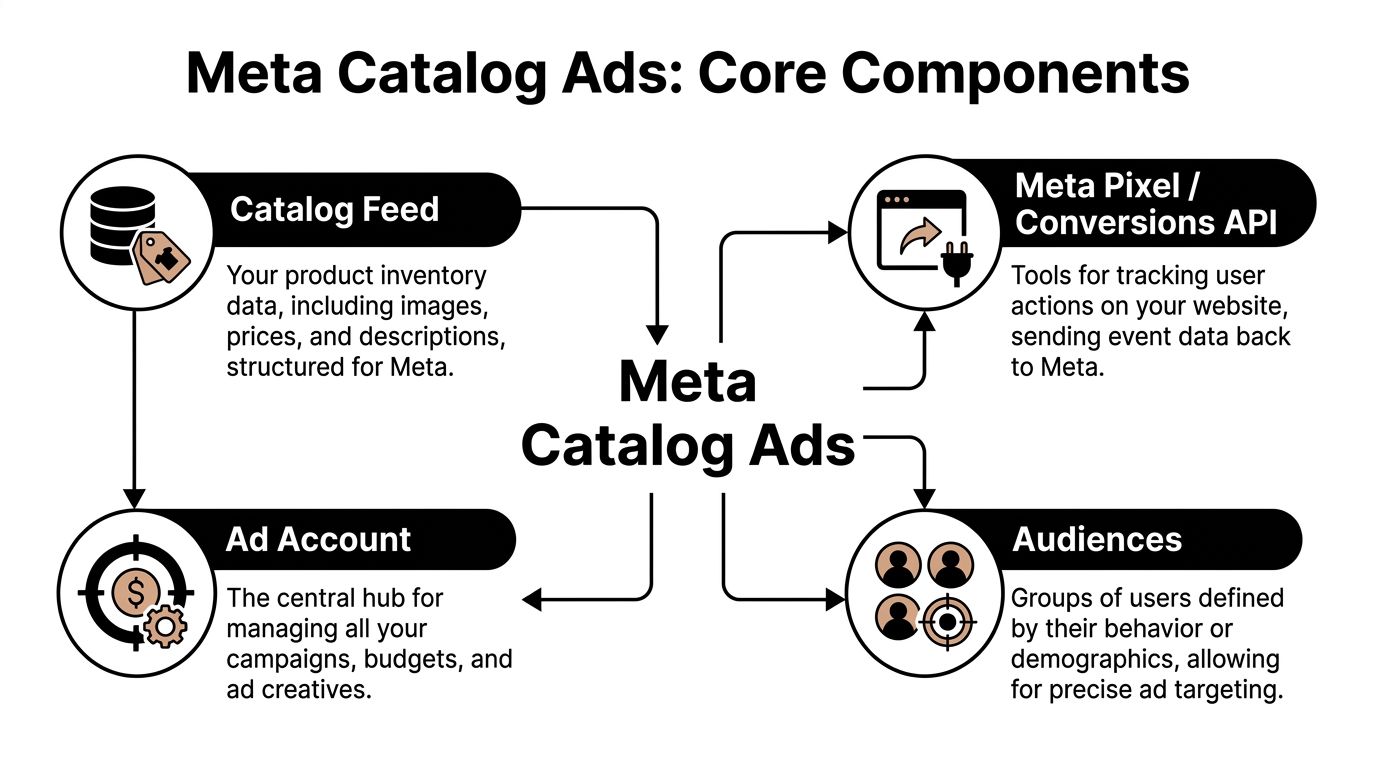
Meta catalog ads have four core parts that work like a retail operation: the catalog, the feed, the tracking layer, and the ad account. If one breaks, performance usually degrades in ways Ads Manager does not make obvious. You might still see purchases. You just get weaker product matching, wasted spend on the wrong SKUs, and less control over where scale comes from.
Catalog feed
The feed is the product data Meta uses to assemble and rank ads. It includes titles, images, prices, availability, landing pages, and product IDs.
This is not admin work. It is the input layer for automation.
If titles are vague, images are inconsistent, or availability lags behind the store, Meta has less context and fewer clean options to serve. That usually hurts click quality first. Profit tends to follow. Brands with large assortments feel this faster because weak feed structure makes it harder to separate hero SKUs, launches, seasonal items, and low-margin products into rules that the system can use.
Pixel and Conversions API
The pixel and Conversions API connect on-site behavior back to the catalog. Meta needs that signal to understand which products were viewed, added to cart, and purchased.
For a plain-English explanation of how the tracking layer works, this guide to pixel tracking helps when you're reviewing setup with a broader team.
Product-level matching matters more than event volume alone. A ViewContent event with the wrong content ID is less useful than a smaller volume of events mapped cleanly to the right SKU. The same goes for purchases. If Meta cannot reliably connect conversion events to the catalog, dynamic ads start optimizing off partial truth.
Ad account
The ad account controls budget, delivery, exclusions, creative format, and campaign structure. It also determines how much freedom Meta has to make merchandising decisions for you.
A single ad account can easily contain overlapping catalog campaigns, repeated product sets, and audience exclusions that were never maintained after launch. That creates internal bidding pressure and muddy reporting. Teams often read that as volatility in the channel when it is really a structure problem.
Audiences and product sets
Audiences define who is eligible to see an ad. Product sets define what can be shown.
The second lever is where profitable scale usually gets won or lost. A full-catalog setup gives Meta convenience, but not enough business context. Product sets add that context. They let you separate bestsellers from low-margin accessories, keep discontinued or slow-moving items out of prospecting, and force cleaner exposure for launches that would otherwise get buried.
A practical structure usually includes:
Core catalog: Every item approved for advertising
Performance sets: Bestsellers, proven converters, replenishable products
Business-rule sets: High-margin SKUs, seasonal collections, bundles, launch products
Audience pairing: Broad prospecting, viewers, cart abandoners, past purchasers
Exclusions: Products or customer groups that should not overlap
That is the foundation. Once these four pieces are set up correctly, catalog ads stop behaving like basic retargeting and start acting like a profit-aware distribution system.
Connecting Your Shopify Store to Meta Correctly
Most meta catalog ads problems start before the first campaign launches. The Shopify connection looks complete because products appear in Commerce Manager, but the underlying setup is often brittle.
The weak points are predictable. Feed syncs are incomplete. Product IDs don't match across systems. Pixel events fire, but they don't map cleanly back to the catalog. That’s when dynamic retargeting starts missing obvious opportunities.

Start with feed integrity
Before touching campaigns, inspect the Shopify to Meta product flow. Every active product that should advertise needs accurate titles, images, price fields, availability, and stable IDs.
The benchmark upside is real when the setup is right. Retail ads on Meta average a 1.59% CTR, and apparel reaches 1.71%, based on 2025 Meta ad benchmarks by industry from AdAmigo. But those outcomes depend on a correctly configured feed and tracking layer. Catalog ads don't rescue bad plumbing.
A practical audit should cover:
Product naming: Keep titles clear enough for humans, not stuffed for internal merchandising convenience.
Image quality: Make sure the primary image fits the placement style you want to win in.
Availability rules: Out-of-stock products should stop flowing into active ad delivery.
Variant logic: Decide whether size or color variants deserve separate treatment or should roll up to parent logic.
The product ID check that brands skip
This is the failure that breaks dynamic ads. The content_id passed by the pixel or CAPI has to match the ID used in the catalog.
If Shopify sends one identifier, the feed uses another, and the pixel reports a third, Meta can still report activity. But the personalization quality drops because it can't reliably tie user behavior to the correct SKU.
Symptoms usually look like this:
Symptom | Likely cause |
|---|---|
Viewed-product retargeting feels random | Pixel IDs don't align with catalog IDs |
Purchases appear in reporting but not on product-level views | Event mapping is incomplete |
Some products never show in DPA retargeting | Feed item is missing or disapproved |
Catalog diagnostics look healthy but performance is uneven | IDs match inconsistently across variants |
Pixel plus CAPI, not one or the other
Shopify brands should treat browser-side tracking and server-side tracking as a pair. The pixel captures browser events. Conversions API helps preserve signal quality when browser-based tracking misses.
That setup also improves how much of your sales activity Meta can connect back to ad delivery. It’s one of the main reasons serious catalog advertisers don't stop at a basic app install.
If your team also sells through Instagram surfaces, this walkthrough on how to set up a shop on Instagram helps align the storefront side with the ad infrastructure.
A quick walkthrough helps if you're validating the wiring with your team:
Commerce Manager is not just a checkbox
Brands often treat Commerce Manager as a passive repository. It’s not. It’s the control layer for feed diagnostics, item status, product sets, and event matching quality.
Use it actively. Check diagnostics. Review item issues. Confirm the right catalog is attached to the right ad account. Make sure custom labels are arriving if you plan to segment products later.
Bad catalog performance often traces back to a boring setup error, not a complex media problem.
If the Shopify connection is right, campaign optimization gets easier. If it’s wrong, every later fix is slower and more expensive.
From Vanity ROAS to Margin-Aware Optimization
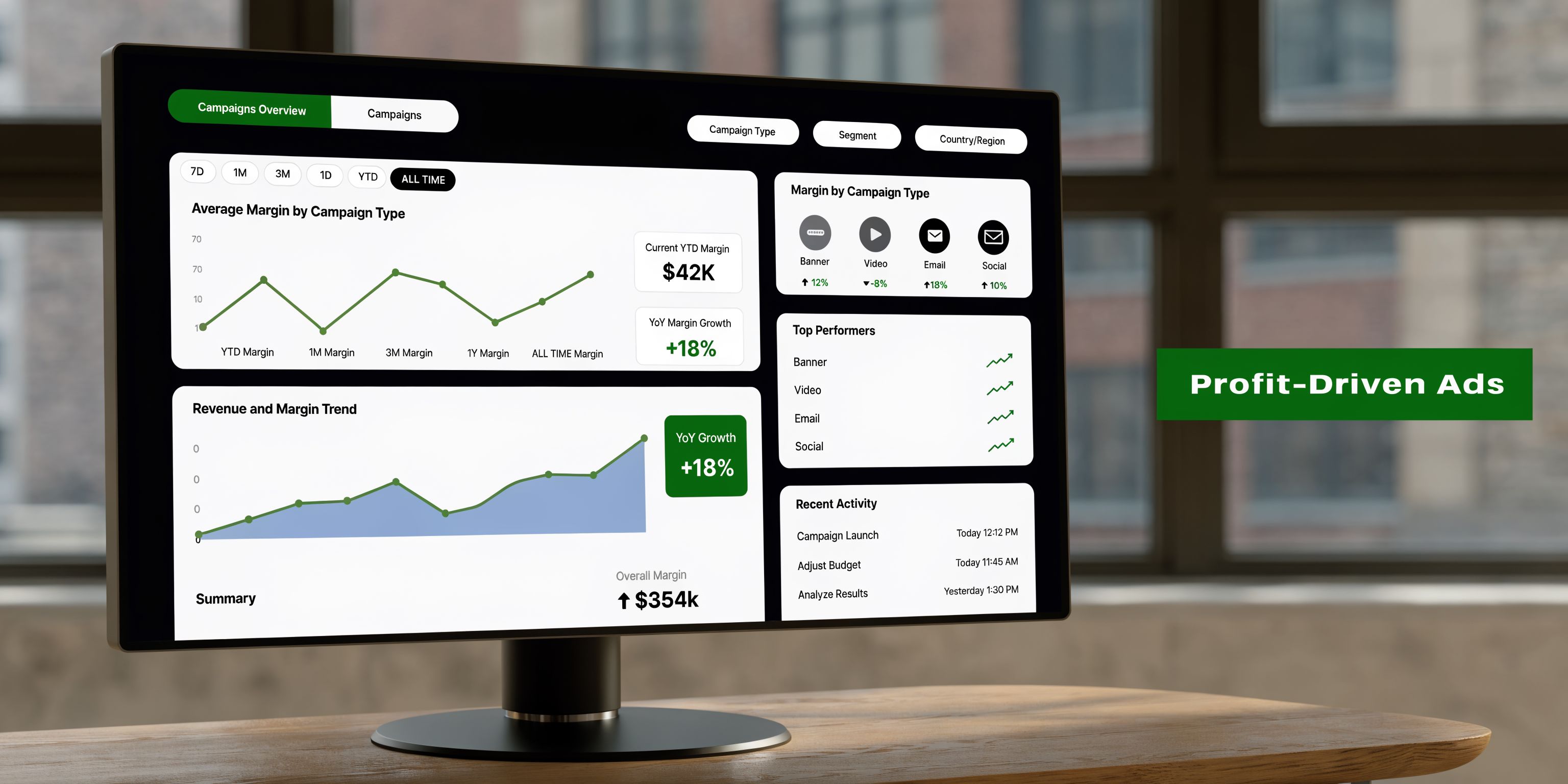
A catalog campaign can show a healthy ROAS and still lose money once discount depth, shipping cost, returns, and product margin are factored in. That is usually the point where teams realize Meta is optimizing for the signals it receives, not for the business outcome the finance team cares about.
Why ROAS alone misleads teams
Many DTC brands optimize Meta catalog ads for the metric that is easiest to see in Ads Manager. That metric is ROAS.
ROAS still matters. It just breaks down when it becomes the only rule for budget allocation. A SKU can post a strong platform ROAS and still be a weak scale candidate if contribution margin is thin, return rate is high, or repeat purchase behavior is weak.
The cleanest example is simple. A product at 4x ROAS with 15% margin is usually a worse scaling candidate than one at 2.5x ROAS with 65% margin. The second product gives you more room to buy volume, absorb volatility, and stay profitable as spend increases.
Meta does not know any of that unless you feed it the logic. Left alone, the system will often favor products that generate easy clicks and cheap conversions, even if those orders are less valuable to the business.
Use custom labels like business rules
Custom labels make catalog strategy operational. They turn a flat product feed into a decision system that controls which SKUs are allowed into which campaigns.
A useful structure looks like this:
Heroes: Proven products with stable conversion history and healthy margin.
Potentials: Products with promising engagement or conversion signals, but not enough proof to scale broadly.
New launches: Items that need dedicated testing because the platform does not have enough history yet.
Long tail: Products that can pick up incremental demand with limited spend.
Dead: Products that have spent enough to lose eligibility until something changes.
This setup matters because product sets are not just for reporting. They decide distribution. If high-margin heroes and low-margin clearance items sit in the same pool, Meta can send spend toward the item that wins the cheapest conversion, not the one that improves account-level profit.
What changes when you optimize for profit
Teams that switch to margin-aware tiering usually change three operating habits.
First, they stop treating every purchase as equally valuable. Second, they protect budget for products that can carry CAC at scale. Third, they reduce weekly SKU debates because the rules already exist inside the catalog.
A simple comparison shows the difference:
Metric | Vanity view | Profit-aware view |
|---|---|---|
High ROAS, low margin SKU | Looks like a winner | May need capped spend or exclusion |
Moderate ROAS, strong margin SKU | Looks average | Often deserves more delivery |
New product with no history | Gets ignored | Gets a controlled test budget |
Persistent spender with no purchases | Stays live too long | Gets removed faster |
For teams that want a cleaner definition of the old metric before replacing it, this explanation of return on ad spend is a useful baseline.
ROAS should stay on the dashboard. It should not run the system. Profitable catalog growth comes from deciding which SKUs deserve reach, which ones deserve restraint, and which ones should never enter the auction in the first place.
Building a Three-Layer Campaign Architecture
A single catalog campaign usually looks efficient right up until spend scales. Prospecting starts stealing budget from retargeting. Retargeting keeps chasing weak viewers. Existing customers get shown the same product they already bought. The account still reports purchases, but profit gets harder to protect.
A three-layer architecture fixes that by giving each stage of intent its own job, budget logic, and SKU pool.
Layer one for prospecting
Prospecting should introduce the brand through products that can win with cold traffic and still protect contribution margin. That usually means hero SKUs, proven bundles, and a limited set of launches. It does not mean the full catalog.
Meta broad targeting can work well here, but only if the product set is disciplined. If high-converting but low-margin items sit beside stronger profit drivers, delivery often shifts toward the cheapest conversion path instead of the best commercial outcome.
What usually belongs in this layer:
Hero-led sets: Products with conversion history, stable stock, and healthy margin.
Selective launch sets: New products with controlled budget so they earn data without disrupting core spend.
Broad or Advantage+ audiences: Useful for scale when the SKU pool is already filtered.
What usually hurts performance:
Sending cold traffic to the entire assortment.
Mixing clearance items, evergreen winners, and first-time launches in one set.
Running overlapping prospecting campaigns against the same products and audience pools.
Prospecting is where assortment discipline matters most. Meta can only optimize inside the pool you give it.
Layer two for retargeting
Retargeting should reflect actual shopping behavior, not just site traffic volume. A product viewer, a cart abandoner, and a shopper who viewed four SKUs in one session are not the same user. They should not sit in the same audience with the same message cadence.
The strongest retargeting setups segment by both recency and action depth. Recent cart abandoners usually justify the most direct product reminder. Older viewers often need a broader product angle, a different offer, or less aggressive frequency.
A practical split looks like this:
Recent viewers: Product-specific ads, shorter lookback windows, tighter frequency control.
Cart abandoners: Stronger urgency, clearer objection handling, fast exclusion after purchase.
Multi-product browsers: Category or collection-level retargeting, especially when browsing behavior suggests comparison shopping.
This layer is easy to overspend. Audience size is smaller, intent decays quickly, and stale windows can keep weak users in circulation long after they are likely to convert. Tight exclusions and shorter recency bands usually beat bloated retargeting pools.
Layer three for retention and cross-sell
Retention and cross-sell often stay underbuilt in accounts with strong new customer pressure. The missed opportunity usually comes from a specific pattern. Brands keep showing past buyers the same front-end bestseller instead of the next logical product.
This layer works best when the catalog reflects purchase sequence. Replenishment brands can map expected reorder timing. Brands with wider assortments can group complementary products by use case, not just category. Someone who bought a starter product may need an accessory, refill, or premium version next.
Useful retention audiences often include:
Recent first-time buyers who have not made a second purchase.
Customers whose reorder window is approaching.
Buyers of one product family who have not purchased its complementary items.
Strong retention catalog ads extend customer value. They do not repeat the acquisition message.
Budget share here is often smaller than prospecting, but the economics can be better. The audience already knows the brand, conversion friction is lower, and average order value often improves when cross-sell logic is tight.
Use Dynamic Media by audience intent
Creative format should match the job of each layer. With Dynamic Media enabled by default as of September 2025, PPC Land’s report on Meta Dynamic Media points to a clear operational shift. Creative variation is no longer an optional extra for catalog advertisers. It is part of how the system packages the same product feed for different levels of intent.
Prospecting usually benefits from more motion, lifestyle context, and discovery-oriented presentation. Retargeting usually performs better with direct product visibility, clearer pricing, and fewer distractions. Retention often needs utility. Refill timing, complementary use cases, or product benefits that support the second order.
A clean operating rule looks like this:
Campaign layer | Best product type | Best creative feel |
|---|---|---|
Prospecting | Heroes and controlled launches | Video-forward, discovery-oriented |
Retargeting | Viewed and carted products | Direct response, product-specific |
Retention | Complementary or refill items | Utility-focused, repeat-purchase friendly |
The point of this structure is control. Each layer gets its own audience logic, exclusions, budget role, and SKU strategy. That is how catalog ads keep scaling after the basic setup is done.
Monitoring and Troubleshooting Common Issues
Meta catalog ads need maintenance. Not constant panic. Just disciplined monitoring.
Most underperformance shows up first as a small technical symptom. An item gets disapproved. Inventory status lags. A product keeps spending with no signal. If no one checks, those issues become wasted budget.
Feed problems that hurt delivery
Commerce Manager diagnostics should be reviewed routinely. The goal isn't perfection. It's catching issues before they block meaningful product volume.
Look for:
Disapproved items: Usually caused by missing or conflicting product data.
Availability mismatch: Products stay eligible after stock changes.
Image or title problems: Ads can serve, but click quality drops.
Sync lag: Shopify updates don't arrive fast enough for live promotion cycles.
When those issues appear, don't just fix the feed line. Ask whether the underlying data source in Shopify is reliable. A recurring feed error is often a merchandising process problem wearing an ad ops costume.
Performance problems that look like creative issues
Many teams blame the ad when the product pool is the underlying issue.
If one SKU spends heavily with weak results, the right move isn't always to redesign the overlay. Sometimes that product shouldn't be active for that audience in the first place. If a product has sustained spend with no purchase signal, it belongs under review or exclusion.
Use a symptom-cause-response lens:
Symptom | Likely cause | Response |
|---|---|---|
Retargeting CTR is fine but purchases are weak | Product relevance or stock issues | Check product mapping, landing page, and availability |
Prospecting spends unevenly | Hero set too narrow or overlap exists | Review product set exclusions and campaign overlap |
Certain SKUs never serve | Feed errors or weak eligibility | Check item status and product set rules |
Catalog sales feel unstable week to week | Product tiering isn't updated often enough | Refresh labels and remove dead inventory faster |
What to review every week
A simple operating cadence beats sporadic deep dives.
Check feed diagnostics: Catch disapprovals, sync issues, and missing fields.
Review out-of-stock handling: Make sure unavailable products aren't receiving spend.
Audit dead products: Remove items that absorb budget without purchase evidence.
Inspect overlap: Confirm the same SKU isn't competing across prospecting sets.
Watch fatigue signals: If engagement softens, rotate templates or swap hero emphasis.
Good catalog management is boring in the right way. The account stays clean, products stays mapped, and spend keeps flowing to inventory that deserves it.
The payoff is consistency. When teams monitor the mechanics, they stop making reactive campaign changes based on partial signals. That’s when meta catalog ads become scalable instead of fragile.
If your team is tired of managing Meta catalog ads with spreadsheets, manual product tagging, and reactive fixes inside Ads Manager, SpendOwlAI is built for that exact problem. It connects Shopify and Meta, auto-tags products into performance tiers, pushes those labels into Commerce Manager, and helps you run catalog campaigns around profit instead of vanity ROAS.