Your Definitive Guide to Instagram Story Specs
If you remember only two numbers for your Instagram Stories, make them these: 1080 x 1920 pixels and a 9:16 aspect ratio. Getting this right is the absolute foundation for any Story that looks professional. It ensures your content perfectly fills a vertical phone screen, creating that seamless, immersive experience you’re aiming for.
Get it wrong, and you’ll instantly undermine your creative with awkward cropping or ugly black bars.
Your Quick Reference Guide to Instagram Story Specs
Consider this your definitive cheat sheet for building winning Instagram Stories in 2026. I've seen countless hours wasted on re-exporting assets and troubleshooting upload errors, all because the initial setup was off. For performance teams, nailing the specs isn't just about looking good—it's about avoiding Meta's ad rejections and getting your campaigns live without a hitch.
Core Instagram Story Specifications for 2026
Before you even think about the creative itself, make sure your canvas is set up correctly. The 9:16 ratio is the golden rule, but file size and format are just as vital for a smooth user experience. After all, a beautifully designed video that buffers endlessly is a lost opportunity.
And speaking of performance, remember that flawless creative needs flawless tracking. If you're deep in the weeds of performance data, you'll want to understand the Meta Conversions API to get the most accurate picture.
Here’s a quick-reference table with the absolute must-know specs.
Specification | Requirement |
|---|---|
Dimensions | 1080 x 1920 pixels |
Aspect Ratio | 9:16 |
Image File Types | JPG, PNG |
Video File Types | MP4, MOV (MP4 recommended) |
This table covers the basics that will serve you well 99% of the time.
One last piece of advice from years of experience: while Instagram technically accepts MOV files, always export your videos as MP4 files using the H.264 codec. It's the industry standard for a reason, offering the best balance of quality and compression. This simple step leads to faster load times and better compatibility across all devices, which means fewer people swiping away before your message even lands.
Mastering Story Dimensions and Aspect Ratio
Getting the format right is the absolute foundation of a successful Instagram Story. If you want to create that seamless, full-screen experience that grabs attention, your creative must be built for a 9:16 aspect ratio. This is non-negotiable. It's how you make your content fill the entire vertical screen without Instagram awkwardly cropping or padding it.
For the best possible quality, your ideal dimensions are 1080 pixels wide by 1920 pixels tall. Treat this as the definitive canvas for your Story creative. When you stick to these exact measurements, you prevent the platform from compressing your work into a blurry mess or resizing it in ways you never intended.
The Impact of Incorrect Ratios
So, what happens if you try to upload a standard horizontal video (16:9) or a square image (1:1)? Instagram has to make a decision, and neither outcome is good for your brand. The app will either crudely crop your creative—often cutting off key information—or it will shrink it down and slap ugly black bars above and below.
Both scenarios scream "low-effort" to users and can cause an instant swipe-away. For performance marketers, this is a critical failure. A horizontal video, for example, becomes a tiny rectangle lost between those massive bars, making your text and call-to-action completely unreadable and torpedoing your click-through rates.
Key Takeaway: Using the wrong aspect ratio is the fastest way to lose a viewer. Always start your design process in a 9:16 vertical format to ensure your final creative looks exactly as you planned.
Designing for a Vertical World
Embracing the 9:16 ratio is more than just a technical step; it's a creative mindset. You need to think vertically from the very beginning of your process, from composing a shot to designing a graphic.
For Video: Whenever you can, shoot your video vertically on your phone or camera. If you absolutely have to work with existing horizontal footage, get creative with your editing. You can crop into the action or place the horizontal clip within a branded 9:16 background.
For Graphics: Start with a design template that’s already set to 1080 x 1920 pixels. This guarantees every element, from your logo to your CTA button, is perfectly placed and optimized for the Story environment.
Ultimately, respecting the Instagram Story specs for dimensions is the first and most important step. It’s what separates professional, high-performing content from assets that just feel out of place. This ensures your message is delivered clearly and effectively.
Video Specs and Time Limits: Getting It Right
When it comes to Instagram Stories, video is king. But getting your video to look and perform its best starts with the file itself. While Instagram technically accepts both MP4 and MOV files, my advice is to always export as an MP4. It’s simply the most reliable and widely compatible format.
For the actual encoding, the combination you want is the H.264 codec for video and AAC for audio. Think of this as the industry standard. This pairing gives you that sweet spot of high-quality visuals and crisp audio without creating a massive file that will lag on a user's phone.
Understanding Your Time Limits
The amount of time you get to make an impact changes depending on whether you're posting an organic Story or running a paid ad. Knowing the difference is crucial for planning your creative.
Organic Stories: Each individual clip is capped at 15 seconds. If you upload a longer video, Instagram will automatically chop it into a series of 15-second segments for you.
Story Ads: This is where you get more breathing room. For your paid ads, you can use a single, uninterrupted video up to 60 seconds long. This gives you a lot more runway for storytelling or demonstrating a product.
These specs aren't just technical details; they're your ticket to reaching a massive, engaged audience. With 500 million people tapping through Stories every single day, it’s a non-negotiable channel for brands. It’s no surprise that 71.9% of brand content now shows up in Stories, where the average completion rate is a staggering 87%. People are clearly paying attention. You can dive deeper into these numbers in this great breakdown of Instagram Stories statistics.
A slow-loading video is a lost viewer. An unoptimized Story that buffers for even a second can lead to a swipe-away, which directly hurts your campaign's performance and wastes your budget.
Finding the right balance between file size and video quality is a bit of an art. The goal is always to get the smallest file size possible while ensuring it still looks fantastic on a mobile screen. An instant-loading ad is your first and most important step toward better engagement. For more on how this impacts results, check out our guide on how to improve click-through rate, where load speed is a big piece of the puzzle.
Designing for the Instagram Story Safe Zone
Getting your Story dimensions right is just the first step. A perfectly sized 1080x1920 pixel creative can still flop if your key message gets covered up by Instagram's own interface. This is where you have to understand and design for the safe zone.
When someone views your Story, Instagram overlays its own elements on top of your content. Think about the profile info at the top and the message bar at the bottom. Any interactive stickers you add will also take up space. If you're not careful, these elements will block crucial parts of your design.
For this reason, you can't treat the entire canvas as usable space. Your logo, your main offer, and especially your call-to-action (CTA) must all be placed within a centrally located "safe" area. This is the only way to guarantee they'll be seen by everyone, every time.
First, let's get the foundational video specs right. This visual breaks down the technical details you'll need.
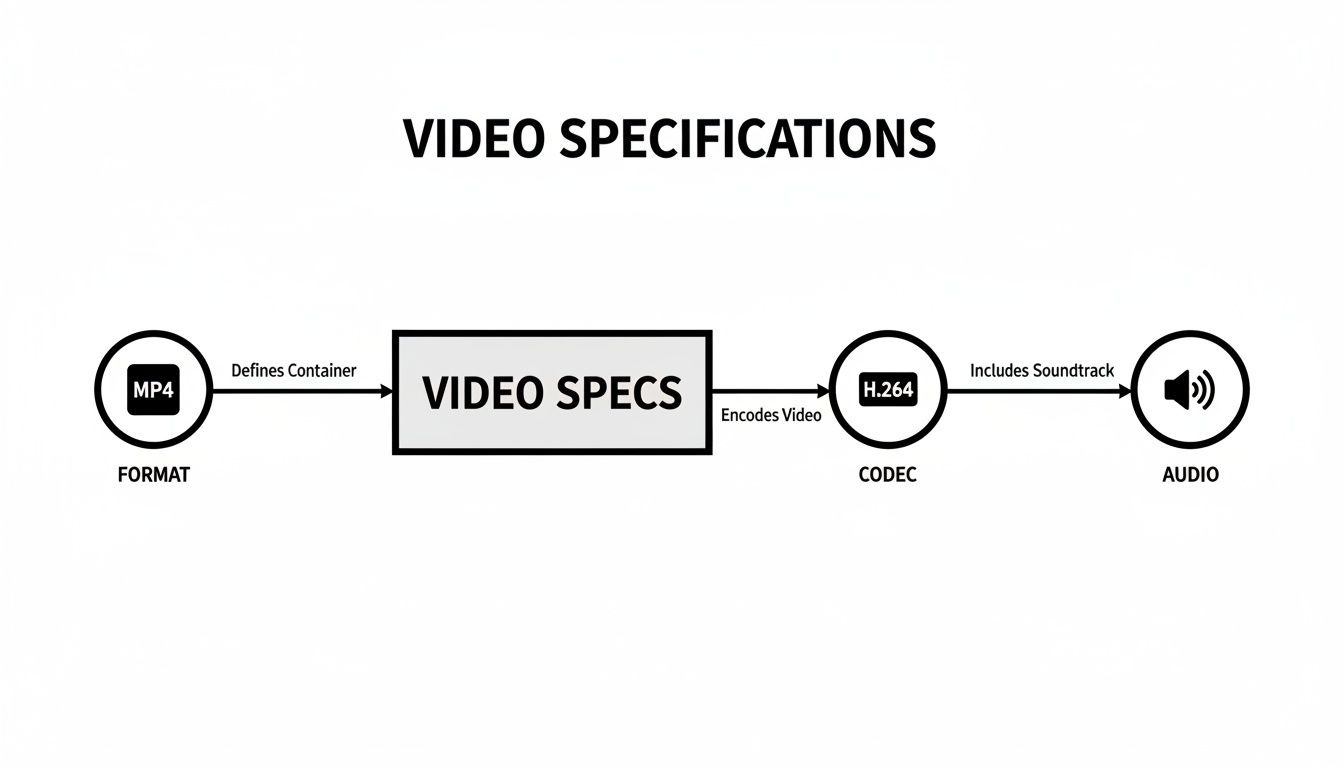
Sticking to the MP4 format with an H.264 codec and AAC audio is your best bet for ensuring your video looks and sounds great across all devices.
Respecting the UI Boundaries
As a simple rule of thumb, keep all essential content out of the top and bottom 250 pixels of your creative. I've seen too many campaigns underperform because this simple rule was ignored. This buffer zone is non-negotiable; it protects your message from being obstructed by Instagram’s native UI.
For performance marketers, this is critical. Ignoring the safe zone is like paying for a billboard and then letting someone cover up the phone number. If your CTA isn't fully visible and easy to tap, you're effectively throwing away ad spend.
To make this completely practical, here are some simple placement guidelines for your most important visual assets:
Logos and Branding: Keep them away from the edges, especially the top left where your profile icon appears. Placing them within the middle 75% of the screen is a good practice.
Main Text or Offer: Position your core message right in the visual center. This is where the eye is naturally drawn, and it's the safest real estate on the screen.
Call-to-Action (CTA): Whether it's a "Shop Now" button or a "Swipe Up" animation, make sure it sits comfortably above the bottom reply bar area. It needs breathing room to be effective.
By building these constraints into your design process from the very beginning, you ensure every pixel of your core message gets seen. It’s a small detail that protects your budget and dramatically increases your chances of getting that tap or swipe.
Instagram Story Ads: What's Different?
While the core specs for Instagram Stories are mostly the same for organic posts and paid ads, there are a few crucial differences every performance marketer needs to know. Getting these wrong can lead to ad rejections or, even worse, wasted budget on creative that was never set up to succeed.
The biggest difference? Video length. Organic Stories top out at 15-second clips, but a single Story ad can run for up to 60 seconds of uninterrupted video. This gives you a much bigger window to tell your story, demo a product, or land a persuasive call-to-action without getting cut off.
Even with the extra time, the fundamentals don't change. You still absolutely need to build your creative at 1080 x 1920 pixels with a rigid 9:16 aspect ratio. And, of course, you have to respect the safe zones to keep the Instagram UI from covering up your message or CTA button.
Key Ad-Specific Considerations
Beyond the technical specs, how you approach your ad creative should tie directly to your campaign goal. An ad built for "Traffic" needs a crystal-clear, can't-miss CTA, whereas a "Brand Awareness" campaign might lean more into narrative and slick visuals. No matter the objective, your ad has to feel like it belongs in the Stories feed.
Feel Native, Not Corporate: The most effective Story ads don't look like ads. They blend in with the user-generated content around them. Think authentic, direct-to-camera footage, not overly polished corporate videos.
Grab Attention in 3 Seconds: You have to stop the swipe, and you have to do it fast. The first three seconds are everything. Use immediate motion, bold text, or a provocative question to hook viewers before they tap on.
Design for Sound-Off: A lot of people watch Stories with the sound on, but you can't count on it. Always use captions or on-screen text overlays to make sure your message gets across, even on mute.
To help you keep track, here's a quick comparison of the main differences between an organic Story and a paid Story ad.
Organic Story vs Story Ad Spec Comparison
Specification | Organic Story | Story Ad |
|---|---|---|
Max Video Duration | 15 seconds (per clip) | 60 seconds (continuous) |
Call-to-Action | "Swipe-up" link (10k+ followers) | Interactive CTA button (e.g., "Shop Now") |
Targeting | Followers / Public | Detailed audience targeting options |
Placement Control | Your own profile | Instagram, Facebook, Messenger Stories |
Ultimately, paid ads give you more time, more powerful CTAs, and precise control over who sees your content.
Here's a huge plus for advertisers: Stories have proven to be incredibly stable. While feed post reach recently dropped by 31% and Reels took a massive 35% nosedive, Stories only saw a minor 6% dip in impressions. This data, highlighted in a full breakdown of Instagram trends, shows just how reliable the format is for consistent performance.
This kind of stability makes it easier for teams to monitor performance and trust the data they're seeing in tools like SpendOwlAI. For anyone serious about driving results, learning how to optimise Facebook and Instagram ads for the Stories format is a non-negotiable skill. When your creative respects both the technical rules and the way real people use Stories, you’re already halfway to a successful campaign.
Nailing Your Export Settings for Maximum Quality
How you export your creative is just as important as how you design it. I’ve seen countless hours of great design work get undone by the wrong settings, because Instagram’s compression can be ruthless. A sharp, vibrant video can turn into a pixelated mess in an instant.
Your goal isn't to trick the algorithm, but to give it the best possible file to work with. By optimizing your export, you minimize the visible quality loss. Think of it as controlling the last, and most critical, step before your work goes live and ensuring it meets all the key Instagram Story specs.
Your Video Export Checklist
Whether you're working in Adobe Premiere Pro, Final Cut Pro, or DaVinci Resolve, these are the settings that have consistently given my team the best results. This is your final pre-flight check before you upload.
Codec: H.264 is non-negotiable. It’s the gold standard for the web for a reason, offering the best balance between file size and visual quality.
Frame Rate: Match your source footage. This is usually 24, 25, or 30 FPS (frames per second). Don’t bother with 60 FPS unless you’ve shot high-speed action; it just inflates the file size for no real benefit in most cases.
Resolution: Stick to the native Story dimension: 1080 x 1920 pixels. Exporting in 4K is a waste of time and disk space. Instagram will just aggressively downscale it, often resulting in a worse-looking file than if you'd exported at 1080p to begin with.
Bitrate: This is a big one. For a 1080p video at 30 FPS, aim for a target bitrate between 8-12 Mbps. Going higher creates a needlessly large file that Instagram will compress more heavily. Dipping too low is when you start seeing those blocky, ugly compression artifacts.
Getting these technical details right is a simple way to protect the hard work you put into the creative.
Audio Settings and Common Pitfalls
Video quality gets all the glory, but crunchy or out-of-sync audio will make people swipe away instantly. Keep your audio settings clean and standard to avoid any nasty surprises.
Recommended Audio Settings
Codec: AAC (Advanced Audio Coding)
Sample Rate: 44.1 kHz
Bitrate: 128 kbps is plenty for stereo audio on mobile.
One of the most common complaints I hear is about color shifting, where a video’s colors look washed out or just plain wrong after uploading. The culprit is almost always the color space. To fix this, make sure you export in sRGB (or Rec. 709). It's the web standard, and it ensures what you see on your monitor is what your audience sees on their phones.
Mastering these settings puts you back in control. It guarantees the effort you invested in creating a brilliant Story isn't sabotaged by a few incorrect clicks in a settings panel, giving your campaigns the polished, professional look they deserve.
Common Questions About Instagram Story Specs
Even with all the specs laid out, a few common questions always seem to pop up. Think of this as your quick-reference FAQ for troubleshooting those tricky little issues that can make or break a Story.
We’ve pulled together the problems our own performance teams run into most often, so you can get clear answers fast and get back to creating.
Can I Post a Story That Isn’t 9:16?
You can, but you absolutely shouldn't. While Instagram will let you upload other aspect ratios like a 1:1 square or a 16:9 horizontal video, the platform will force it into the vertical format.
This usually results in one of two things: ugly, automatic background bars filling the empty space, or an aggressive crop that cuts off key parts of your creative. Both outcomes look unprofessional and kill the immersive feel of Stories. For the best results, always design specifically for the 9:16 aspect ratio (1080 x 1920 pixels) right from the start.
What Is the Best Video Format for Stories?
Stick with MP4. Instagram technically accepts MOV files too, but MP4 is the gold standard for a reason. It offers the best combination of high video quality and small file size, which is exactly what you need for web and mobile.
When you're exporting, make sure to use the H.264 codec for your video and AAC for your audio. This pairing ensures your Story loads quickly and plays smoothly on any device. In a world of short attention spans, a slow-loading video is a guaranteed way to lose a viewer.
Why Does My Story Look Blurry After I Upload It?
This is probably the single most common frustration we hear about. If your crisp video turns into a pixelated mess after uploading, it almost always comes down to Instagram's aggressive compression or incorrect export settings on your end.
You can't stop the compression, but you can give the algorithm a better file to work with.
Nail Your Dimensions: Double-check that you're exporting at 1080 x 1920 pixels. It might seem smart to export in 4K for "higher quality," but it's not. Instagram will just aggressively downscale it, often creating more blur and artifacts in the process.
Find the Bitrate Sweet Spot: For a 1080p video, aim for a bitrate between 8-12 Mbps. If it’s too high, the file will be huge, forcing heavy compression. If it’s too low, the video will already be pixelated before you even upload it.
One more pro-tip: If your colors look washed out or just plain wrong, you're likely in the wrong color space. Always export using sRGB (or Rec. 709). It’s the standard for web content and will keep your colors looking consistent.
What Is the Maximum Length for an Instagram Story Ad?
This is a crucial distinction for anyone running paid campaigns. An organic Story gets sliced into 15-second clips. However, a single, uninterrupted Instagram Story ad can run for up to 60 seconds.
That extra time is a massive advantage. It gives you the space to build a real narrative, properly demonstrate a product, and drive home a strong call-to-action without being cut off. This is exactly why understanding the ad-specific specs is so vital for performance marketers.
Keeping track of all these specs for every single creative can be a heavy lift. That's where SpendOwlAI comes in. It helps by monitoring your ad performance with incredible precision, letting you focus on the creative work instead of getting bogged down in technical details. You get clear, data-driven insights on what’s working, turning complex performance data into simple, actionable steps. Start your free 7-day trial and execute with confidence at https://spendowlai.com.