Google Ads Campaign Optimization A Practical Guide
Optimizing your Google Ads campaigns is more than just tinkering with settings. It’s a systematic process of digging into your account, figuring out what's working (and what's not), and making smart, data-backed changes to boost your ROAS and lower your CPA. This isn't about random tweaks; it’s about having a repeatable framework that turns messy data into profitable action.
A Modern Framework for Google Ads Optimization
The best Google Ads managers operate with a clear, prioritized framework. It's easy to get caught up chasing vanity metrics or making panicked changes after one bad day, but that’s a surefire way to burn cash and throw the algorithms into a tailspin. A much better approach is a disciplined, three-part cycle: Audit, Optimize, and Monitor.
This cycle forces you to put on your detective hat before you start making changes. Instead of immediately cranking up bids when performance dips, you first ask why it dipped. Is the conversion tracking firing correctly? Are we running out of budget before peak hours? Are the ads stale? This "diagnose-first" mentality stops you from trying to optimize a broken machine and makes sure your effort is spent on things that actually move the needle.
Prioritizing Your Optimization Efforts
The secret sauce here is prioritization. Not all tasks are created equal. Fixing a broken conversion tag will always be more valuable than rewriting a single ad headline. In the same vein, knowing which campaigns are your heavy hitters helps you focus your time and energy where they’ll have the biggest impact.
For example, recent data shows Google Ads Search campaigns pulling in a median ROAS of 5.17, blowing past campaign types like Performance Max, which sat at just 2.57. The money follows the performance—Search campaigns snagged 56.2% of total Google ad spend as advertisers doubled down on high-intent channels. Knowing this kind of information, and more importantly, knowing it for your own account, is critical. You can learn more about these performance benchmarks to see how you stack up.
The goal isn't to be busy; it's to be effective. A successful Google Ads operator knows what to change, why they're changing it, and—just as importantly—what to leave alone.
The flowchart below breaks down this simple but powerful process for systemizing your optimization efforts.
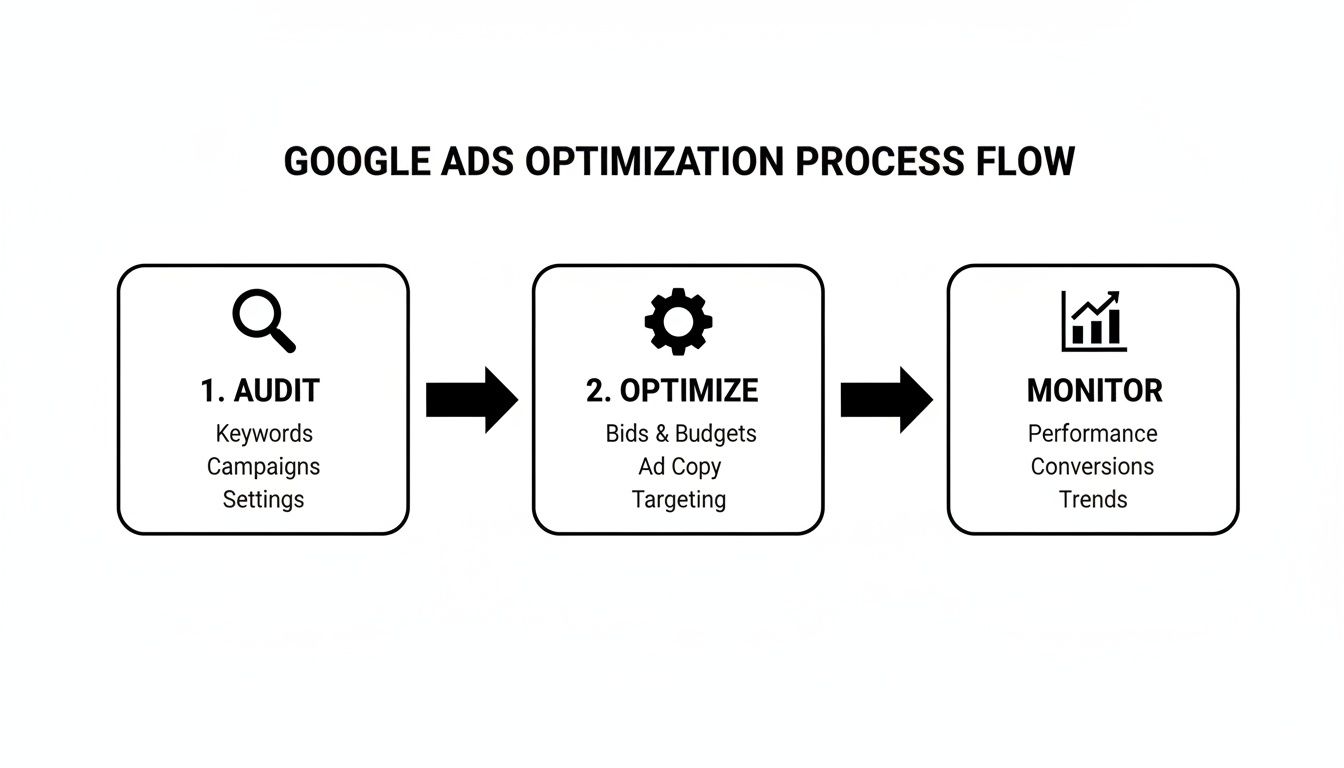
As you can see, great account management is a continuous loop, not a one-and-done fix.
Establishing a Sustainable Workflow
To bring this framework to life, you need a consistent workflow. A routine stops you from making gut-feel decisions and creates a repeatable rhythm for managing the account. This structure helps you spot problems early, jump on opportunities, and keep performance steady.
A structured workflow is key to staying organized and effective. Here’s a simple but powerful way to break down your daily and weekly tasks to keep your campaigns on track without getting bogged down in the small stuff.
Daily vs. Weekly Optimization Workflow
This table outlines a practical breakdown of high-impact tasks to prioritize in your daily and weekly Google Ads management routines, ensuring you're always focused on what matters most for consistent performance and growth.
Timeframe | Key Focus Area | Primary Actions |
|---|---|---|
Daily | Account Health & Triage | Check for ad disapprovals, billing issues, or other critical alerts. Monitor pacing to ensure campaigns are spending correctly against daily budgets. Look for any dramatic, sudden shifts in core metrics (e.g., a massive spike in CPC or drop in conversions). |
Weekly | Performance Analysis & Optimization | Dive into search query reports to add negative keywords and find new keyword ideas. Review ad and asset performance to pause losers and scale winners. Check auction insights for competitor activity. Make informed adjustments to bids and budgets based on a 7-14 day lookback window. |
This tiered approach ensures you are responsive to major issues without being reactive to normal daily fluctuations. It creates the stability that Google's machine learning needs to find its groove and deliver predictable results.
How to Audit Performance and Find the Real Problems
Great Google Ads optimization isn't about randomly tweaking settings and hoping something sticks. It starts with a solid diagnosis. Before you even think about adjusting a bid or rewriting an ad, you need to conduct a thorough health check on your account to understand what the data is really telling you.
This whole process is about avoiding "optimizing" a fundamentally broken system. You have to find the root cause of the problem first.
We’re going to focus on the five pillars that every successful Google Ads account is built on: tracking, budgets, bids, creatives, and audiences. Think of it like a mechanic looking at a car—you wouldn't waste time tuning the engine if the tires were flat.

Is Your Tracking Telling You the Truth?
Let's be blunt: your entire optimization strategy is built on data. If that data is wrong because your conversion tracking is busted, you’re flying completely blind. This is always the first place I look when performance takes a nosedive or just feels... off. A dodgy setup can send automated bidding strategies haywire, burning through your budget on the wrong things.
Get started by heading over to the Conversions section in your account. Any tags screaming "Inactive" or "Unverified" are your first clue.
Next, do a quick sanity check by comparing the conversion numbers in Google Ads with your own backend system, whether that's your Shopify dashboard or company CRM. Do the numbers look similar? A small discrepancy of 5-10% is pretty normal, but if the gap is any wider, you’ve probably got a tracking leak somewhere.
Here are a few common red flags I see all the time:
A Sudden Drop to Zero: If conversions just fall off a cliff, it’s almost always because a recent website update broke your Google Tag Manager or gtag.js implementation.
Duplicate Conversions: Inflated conversion counts are dangerous. They trick you (and Google's algorithm) into thinking a campaign is a rockstar when it's not. Make sure your tags are set up to fire only once per transaction.
Cross-Domain Tracking Gaps: If your shoppers move from a primary domain to a separate one for checkout, you have to ensure tracking follows them through the entire journey. Otherwise, you lose the conversion source.
For a deeper look at this, our guide on UTM parameters for Google Analytics can help you get your campaign tracking right.
Finding Budget and Bid Bottlenecks
Once you're confident the data is solid, it's time to follow the money. Budgets and bids are your primary levers for controlling performance, but if they're misconfigured, they can absolutely suffocate your campaigns.
A classic sign of trouble is the dreaded "Limited by budget" notification. This means your daily budget is getting tapped out before you can capture all the available traffic for your keywords. The easy answer seems to be "just increase the budget," but hold on. First, you need to understand when you're losing that traffic.
Dive into the "Hour of day" report. Is your budget exhausted by lunchtime? If so, you're missing out on the most valuable conversion times, which are often in the evening.
A campaign that runs out of budget at 2 PM is effectively invisible during peak evening shopping hours. You're not just losing impressions; you're losing your most valuable ones.
The same goes for your bidding strategy. Are you still clinging to Manual CPC for a high-volume campaign that could be crushing it with Google's automated signals? Or have you set your Target ROAS so aggressively high that it's choking off all your traffic, preventing the algorithm from ever learning? Look back at the last 14-30 days and be honest about whether your bid strategy is actually helping you hit your goals.
Checking Your Creative and Audience Alignment
Finally, let's look at what you’re showing people and who you’re showing it to. Even with flawless tracking and a massive budget, you'll just waste money if your ads are terrible or your targeting is off. What matters here is the alignment between your keywords, your ad copy, and your landing page.
A low Quality Score (anything below a 5/10) is a massive red flag that this alignment is broken. It directly impacts your ad rank and, more importantly, how much you have to pay for each click. You need to pick apart its three components:
Expected CTR: Is your ad copy actually compelling, or is it just... there? Does it make people want to click?
Ad Relevance: Does your ad copy directly mirror the intent behind the keywords in its ad group?
Landing Page Experience: When someone clicks, does the page load quickly and deliver exactly what the ad promised?
Sometimes the issue is subtle. A small drop in landing page speed can tank your user experience score, which in turn lowers your Quality Score and drives up your CPCs. Use Google's PageSpeed Insights to see how you're doing on mobile and desktop.
If your ads and landing pages seem solid but performance is still weak, the problem might be your audience. Are you actually reaching the right people? Or have you cast the net too wide with broad match keywords that are attracting tons of irrelevant searches? Regularly digging through your Search Terms Report isn't just a good idea—it's a non-negotiable part of managing a successful Google Ads account.
Let's be honest: the days of painstakingly tweaking individual keyword bids are over. If you're still doing that, you're fighting a losing battle. Modern Google Ads management is all about working with Google's AI through automated bidding, not against it. These strategies are the engine of any high-performing account today, freeing you up to focus on the big picture.
But just flipping a switch to "Target ROAS" and hoping for the best is a recipe for disaster. These algorithms are incredibly powerful, but they aren't magic. They need the right fuel—good data, enough budget, and a stable environment—to really get going. Your job is to feed the machine what it needs to win.
Choosing the Right Automated Bidding Strategy
Your bidding strategy has to mirror your business goals. It's a simple concept, but one of the most common—and costly—mistakes I see is a mismatch between the two. There's no single "best" option; it all comes down to what you're trying to accomplish.
Here’s how I break it down for clients:
Driving profitable sales? Use Target ROAS (Return On Ad Spend). You tell Google exactly what return you need for every dollar you spend, and it goes to work. This is the go-to for e-commerce brands with clear margins.
Need more leads? Go with Maximize Conversions or Target CPA (Cost Per Acquisition). If you just need as many form fills or phone calls as possible within your budget, these strategies will aggressively hunt for them.
Building brand awareness? Maximize Clicks can work for driving top-of-funnel traffic, but be aware that it doesn't care much about what those users do once they land on your site.
The real key is patience. Pick the right strategy and give the algorithm time and data to learn. If you're constantly switching things up, you're just resetting the learning phase over and over, which leads to nothing but volatility.
The Critical Link Between Bids and Budgets
Your daily budget and your bidding strategy are two sides of the same coin. I see this all the time: an advertiser sets an aggressive goal (like a super-high ROAS) but pairs it with a tiny budget. That sends completely conflicting signals to Google's AI, essentially tying its hands behind its back.
Think of it like telling a race car driver to win the Indy 500 but only giving them enough gas for two laps. It's never going to work. As a rule of thumb, if your Target CPA is $50, your daily budget needs to be at least $250–$500. This gives the system enough breathing room to enter auctions, gather data, and figure out what actually works.
A budget that's too small for your bid target will starve the algorithm. It can't afford to learn, leading to inconsistent delivery and performance that never gets off the ground.
If you see that dreaded "Limited by budget" status, don't just throw more money at it. First, ask yourself: is this campaign actually profitable? If yes, then increasing the budget is a no-brainer to capture more conversions. If not, then you have bigger problems to solve before you spend another dime.
Supercharging Smart Bidding with Quality Score
While automation handles the auction-time bidding, your inputs are what make it truly effective. The single most powerful lever you have for making any automated strategy more efficient is your Quality Score. It's the secret sauce that makes your budget go further.
A high Quality Score signals to Google that your ads and landing page are a great match for what the user is searching for. Google rewards this with a lower cost-per-click. This discount directly boosts your automated bidding performance. For example, with a $50 Target CPA, a better Quality Score lets Google win more auctions for less money, pushing your actual CPA well below your target.
It’s no surprise that automated bidding now powers over 80% of advertisers. But its success still hinges on solid fundamentals. The data is clear: improving your Quality Score from a 5 to an 8 can slash your CPC by 50%, giving Smart Bidding way more firepower. You can learn more by checking out these 2025 Google advertising benchmarks. This all comes down to ad relevance and landing page experience. For a deeper dive, our guide on Broad Match vs. Phrase Match keywords shows how your keyword strategy directly impacts this.
Tactical Playbooks for High-Performing Campaigns
Trying to optimize every Google Ads campaign the same way is a recipe for disaster. The levers you pull for a classic Search campaign are completely different from what works for Performance Max. If you apply the wrong tactic to the right campaign, you're just lighting your budget on fire.
Real success comes from having a specific playbook for each campaign type. Each one has a different job to do, and that means they need a unique approach. By understanding these nuances, you can stop wasting time on low-impact tweaks and focus on what actually moves the needle for the campaign you're working on.
The Search Campaign Playbook
Search campaigns are the bread and butter of most accounts. They're built to capture people who are actively looking for what you sell. The name of the game here is relevance and precision. Everything comes down to how tightly you can align your keywords, ad copy, and landing pages.
One of the most valuable things you can do is live inside your Search Terms Report. This isn't just about finding junk to add to your negative keywords list. You're on a treasure hunt for new, high-performing queries that deserve their own ad groups.
When you spot a search term that’s converting well, pull it out. Give it a dedicated ad group. This lets you write hyper-specific ad copy that speaks directly to that user's intent, which can send your Click-Through Rate (CTR) and Quality Score through the roof.
Constantly testing your ad copy is the other critical piece. Your goal isn't just to get clicks; it's to get the right clicks.
Lead with your USPs: What makes you the obvious choice? Free shipping, a lifetime warranty, 2,000+ 5-star reviews? Get that into your headlines.
Use concrete numbers: "Ships in 24 hours" is way more compelling than "Fast shipping." "Over 10,000 happy customers" builds more trust than "Trusted by many."
Match your language to the intent: Someone searching for "buy now" keywords needs different messaging than someone searching for "how to" keywords. Make sure your call-to-action fits where they are in their journey.
The Shopping Campaign Playbook
For any e-commerce brand, Shopping campaigns are usually the main engine for revenue. In this world, your product feed is everything. A weak, unoptimized feed is like trying to sell products in a store with blurry photos and no price tags—it’s just not going to work.
Your absolute top priority has to be enriching your product data. This means going way beyond the minimum requirements. Make sure your product titles are descriptive and packed with the keywords people actually search for, like the brand, color, size, and material. And it goes without saying, but high-quality images from multiple angles are non-negotiable.
A well-structured product title is your best keyword. Instead of "Men's Shirt," a title like "Nike Dri-FIT Legend Men's Short-Sleeve Training T-Shirt - Blue - Size L" gives Google's algorithm precise signals to match against user queries.
Once your feed is in good shape, the next level of optimization is smart bidding at the SKU level. Don't just set a single ROAS target for the whole campaign. Break your inventory into product groups based on margin, brand, or performance. This lets you push harder on your high-margin bestsellers while easing off the gas for products that are underperforming or have razor-thin margins.
The Performance Max Playbook
Performance Max (PMax) is a totally different animal. It's often called a "black box" because it runs across all of Google's channels automatically. Your job isn't to micromanage it; it's to feed the algorithm the best possible signals and set clear guardrails. Your control comes from the quality of the assets you provide.
The most important task is building out high-quality, diverse asset groups. Don't skimp here. You need to provide a full suite of creative assets:
High-Resolution Images: A mix of lifestyle shots and clean product-focused images.
Compelling Videos: Short, engaging videos made for different formats (vertical, square, horizontal).
Sharp Ad Copy: A variety of long and short headlines and descriptions.
Audience Signals: Give the algorithm a head start by providing your first-party data, like customer lists and website visitor audiences.
While you can't pick your placements directly, you can—and should—regularly check the Placement Reports. Hunt for any websites or apps that are off-brand or performing poorly. You can add these as account-level exclusions to protect your brand and stop wasting money.
Finally, remember that PMax will send users to all sorts of pages on your site, so improving the overall customer journey is key. Our guide to website conversion optimization has some great ideas for getting your landing pages ready. This holistic approach ensures your google ads campaign optimization efforts are focused and effective for each unique campaign type.
To simplify this, here's a quick-glance checklist breaking down the top priorities for the most common campaign types.
Campaign Type Optimization Checklist
Campaign Type | Priority 1 | Priority 2 | Priority 3 |
|---|---|---|---|
Search | Mine Search Terms Report for new keywords & negatives. | Constantly test and refine ad copy with strong USPs. | Ensure tight keyword-to-ad-to-landing page relevance. |
Shopping | Enrich product feed data (titles, images, attributes). | Segment products into groups for granular bidding. | Set specific ROAS/tCPA targets by product group. |
Performance Max | Provide a diverse set of high-quality creative assets. | Upload strong first-party audience signals. | Monitor placement reports and add brand safety exclusions. |
Think of this table as your starting point. When you sit down to work on an account, pull up this list and ask yourself if you've checked these boxes for each campaign. It's a simple way to make sure you're always focusing on the highest-impact actions first.
Implementing Changes Safely with Guardrails and Monitoring

You've done the audit, you've diagnosed the issues, and you have a solid hypothesis for what to change. Now comes the hard part: actually making the change without breaking something. I've seen it happen dozens of time—a well-meaning "optimization" tanks a perfectly good campaign overnight. The real risk isn't standing still; it's making a rash, untested update.
This is where true google ads campaign optimization shifts from theory to disciplined practice. It's about testing your ideas in a controlled way, setting clear rules to protect your accounts from knee-jerk reactions, and then watching the data like a hawk. This process takes the anxiety and guesswork out of managing big budgets.
Test Before You Trust with Experiments
Before you bet the farm on a major strategy shift—like moving from a Target CPA to a Target ROAS bid strategy or overhauling your landing page—you have to run an experiment. This is non-negotiable. Google's built-in Experiments feature is perfect for this, letting you run a clean A/B test.
Think of it this way: you can split your campaign’s traffic 50/50, sending half to the new "experiment" and leaving the other half on the original settings. Maybe you think a more aggressive ROAS target will boost profit. Instead of just changing it and hoping for the best, an experiment gives you a direct, apples-to-apples comparison under the exact same market conditions. This is how you prove your hunch is correct before you go all-in.
Don't gamble with your entire budget. Use experiments to isolate variables and prove your optimization ideas on a small scale before committing to a full rollout. It's the ultimate safety net.
Let your experiment run until you hit statistical significance. This usually takes at least two to four weeks, but it really depends on your conversion volume. Once the data gives you a clear winner, you can confidently apply the change to 100% of the campaign.
Set Guardrails to Prevent Over-Editing
One of the most destructive habits I see is constant tinkering. An account manager gets nervous after a bad day and starts pulling levers, completely disrupting the machine learning. These reactive tweaks prevent automated bidding from ever hitting its stride. You need to build guardrails—predefined rules for when and how you make changes.
These rules aren't about being slow; they're about being deliberate. They help you distinguish between a real performance trend and random daily noise. Here are a few guardrails I live by:
The 7-Day Rule: Never, ever make a significant change based on one bad day's performance. Always look at a 7-14 day window to get a clear picture before touching bids or budgets.
The 20% Cap: When you do adjust a budget or bid target, keep the change to a maximum of 20% at a time. Big, sudden shifts can shock the algorithm and send performance into a tailspin.
Keep a Change Log: This sounds basic, but it's critical. Meticulously document every major change. When performance suddenly dips, you can trace it back to a specific action instead of guessing.
Guardrails protect your campaigns from your own worst impulses. They force you to be a strategist, not just a reactor.
Monitor and Validate Your Results
Once you've rolled out a change, you're not done. The final step is to monitor performance to make sure it actually worked as intended. Don't just look at one metric in a vacuum; you need to understand the full story.
So your new landing page lifted the conversion rate? Fantastic. But did it also kill your average order value? Did that budget increase get you more conversions? Great, but did your ROAS hold steady, or did it fall off a cliff?
After any implementation, keep a close watch on these KPIs for the next 7-14 days:
Primary Goal Metric: Is your ROAS, CPA, or total conversion volume heading in the right direction? This is your North Star.
Efficiency Metrics: How did the change affect your Cost-Per-Click (CPC) and Click-Through Rate (CTR)? Sometimes an improvement here can signal future success.
Volume Metrics: Check for any major shifts in Impressions, Clicks, and overall Cost.
This three-part framework—test, guard, monitor—creates a reliable system for google ads campaign optimization. It's how you drive consistent, predictable growth while keeping risk to a minimum.
Frequently Asked Questions
When you're deep in the trenches managing Google Ads, a lot of questions come up. Even experienced pros find themselves second-guessing things like how often to make changes, what to do when performance suddenly tanks, or whether manual bidding even has a place anymore. Let's tackle some of the most common ones.
How Often Should I Optimize My Google Ads Campaigns?
There’s no single right answer here—it really depends on how much you're spending and how many conversions you’re getting.
For accounts with massive budgets, a quick daily check-in is just good hygiene. You’re not making big strategic changes; you’re just making sure the wheels haven’t fallen off. Think of it as a triage pass: Are my budgets pacing correctly? Did any critical ads get disapproved overnight? Catching these early can save you a world of hurt.
But for most advertisers, a dedicated weekly deep-dive is the sweet spot. This is your time to analyze performance over the last 7-14 days, which smooths out the daily volatility and gives you a much clearer picture of what's actually working.
Your weekly rhythm should look something like this:
Dig into your search query reports. What are people actually typing? This is a goldmine for finding new negative keywords to add and sometimes even spotting ideas for brand new ad groups.
Check your creative performance at the asset level. Pause the duds and give the winners more breathing room.
Adjust bids and budgets based on trends, not a single day's weird spike or dip.
The real key is consistency. If you're constantly making big, reactive changes every day, you’re just resetting the algorithm’s learning phase over and over. You end up creating the very instability you're trying to fix.
What Are the First Things to Check When Performance Drops?
Seeing a sudden drop in performance is jarring, but the absolute worst thing you can do is start changing things randomly. You need a process. A diagnostic checklist helps you find the root cause instead of just flailing around.
I always start with the simplest, most common culprits before going down a rabbit hole.
Is everything still plugged in? Seriously, check your tracking first. Is the conversion tag still firing? Did a website update break something or grind your landing page to a halt? This is always square one.
What did we change? Head straight to the "Change History" report. More often than not, the culprit is right there in black and white—a budget was tweaked, a bid strategy was swapped, or a new keyword was added right before the drop.
Who else is in the auction? Pop open the Auction Insights report. Did a new, aggressive competitor just show up and start driving your CPCs through the roof? Or did an old rival just get a fresh round of funding?
Where is the money going? For Performance Max, check if the campaign suddenly decided to shift most of its spend to a low-performing channel like Display. For Search, see if a broad match keyword went rogue and started pulling in a ton of garbage queries.
A methodical approach like this will help you find the real problem fast.
Can I Still Use Manual Bidding for Optimization?
While Manual CPC is still technically an option, its role has become incredibly specialized. The truth is, for well over 80% of advertisers, automated strategies like Target ROAS or Maximize Conversions will run circles around even the most diligent human manager. They’re processing billions of real-time signals—device, location, time of day, browser history—that we simply can't.
That said, manual bidding isn’t completely useless. It has a very specific, limited role.
Think of it as training wheels. On a brand-new campaign with zero conversion history, the algorithm has nothing to go on. Using Manual CPC for a short time can help you control your initial costs and gather that crucial baseline data. You have total control when Google’s AI is flying blind.
But the long-term goal for almost any advertiser focused on results is to graduate to an automated strategy. Your job shifts from pulling levers to feeding the machine high-quality data. Fighting the algorithm is a losing battle; the biggest wins in Google Ads campaign optimization come from learning how to partner with it.
Instead of getting lost in dashboards, let SpendOwlAI give you a clear, prioritized list of exactly what to change in your ad accounts. Our platform offers data-backed guidance and tells you why you should make a change, so you can execute with confidence. See the difference for yourself with a free 7-day trial.