Mastering Carousel Ads Instagram for High-Impact Results
In a feed where everything flashes by in an instant, getting someone to pause for even a few extra seconds is a huge win. That’s exactly where Instagram carousel ads shine. They aren't just a different ad format; they're a powerful way to tell a story or show off your products using multiple images or videos in one swipeable post.
Why Carousels Are Essential for Instagram Advertising
The biggest challenge on Instagram? Just getting someone to stop scrolling. With so much content fighting for attention, carousel ads give you a strategic edge. They're a smart answer to the rising ad costs and dwindling engagement that many of us are seeing across the platform.
The magic is in the interaction. When someone sees a single image, they can scroll right past it. But a carousel invites them to swipe, turning a passive glance into active engagement. This small action completely changes how people connect with your ad and, just as importantly, how the Instagram algorithm sees it.
The Power of Dwell Time and Engagement
Every time a user swipes through your carousel, they're spending more time with your brand. This "dwell time" is a massive signal to Instagram that your content is interesting and valuable.
The algorithm's job is to keep people on the platform. When your ad encourages swipes and holds attention, the algorithm rewards you with better reach and more efficient ad delivery. It’s a simple but powerful feedback loop.
This extra engagement isn't just a vanity metric; it directly impacts your bottom line. Industry reports consistently show that carousels deliver 1.4 times wider reach and an impressive 3.1 times higher engagement than single photos. We’ve seen this firsthand—one of our e-commerce clients, a clothing brand, saw a 30% jump in click-through rates just by using carousels to launch a new collection. You can dig into more of this data by checking out recent industry analyses on how carousels are outperforming other formats.
Here’s a quick look at how carousels generally stack up against other popular ad formats on Instagram.
Carousel Ads vs Other Formats Performance Snapshot
Metric | Carousel Ads | Single-Image Ads | Reels |
|---|---|---|---|
Engagement Rate | Highest | Lowest | High |
Cost Per Click (CPC) | Lowest | Highest | Medium |
Dwell Time | Highest | Lowest | High |
Storytelling Ability | Excellent (sequential) | Limited | Good (narrative video) |
This table shows a general trend we see in the data. While Reels are fantastic for grabbing initial attention, carousels often win on cost-efficiency and the ability to guide a user through a more detailed message, which can lead to better-qualified clicks.
More Than Just Pretty Pictures
Beyond the metrics, carousels give you a bigger canvas to work with. Instead of trying to cram your entire message into a single square, you can walk your audience through a complete story, one card at a time. This is perfect for:
Showcasing a full product line: Display an entire collection or a set of related items.
Breaking down features: Dedicate each card to a specific product benefit or use case.
Telling a before-and-after story: Visually prove the value and transformation your product offers.
Creating a mini-tutorial: Show people exactly how to use your product with a step-by-step guide.
For any performance marketing team or DTC founder obsessed with return on ad spend (ROAS), carousels are a no-brainer. It’s one of the few levers you can pull that can dramatically improve your core metrics without just throwing more money at the problem.
Alright, let's dive into Meta Ads Manager and get your first carousel ad built. This is where the rubber meets the road—moving from ideas to a live, working campaign.
The very first decision you'll make is your campaign objective. For most e-commerce businesses, it usually comes down to a choice between Sales and Traffic. Think of it this way: a Sales objective is your go-to for bottom-of-funnel campaigns. You're telling Meta's algorithm, "Find me the people who are ready to buy right now."
On the other hand, a Traffic objective is built to get you cheaper clicks. This is a solid choice for top-of-funnel content where the goal is more about education or brand introduction, not an immediate purchase.
Setting Up Your Ad Set
With your objective chosen, it's time to configure the ad set. This is your command center for defining your audience, placements, and budget.
When it comes to placements, I usually start by selecting Advantage+ placements and then immediately start trimming the fat. Manually uncheck the placements that just don't feel right for a carousel. Your number one priority should always be the Instagram Feed, since that’s where users are hardwired to swipe through this kind of content.
A quick word of caution: when you launch a new campaign, it can be tempting to fiddle with the settings every time you see a new piece of data come in. Resist that urge. Constant tweaks can throw the algorithm off and reset its progress. If you want to learn more about how to let the system do its job, our guide on navigating the Meta ads learning phase is a must-read.
Assembling Your Creative
Now for the fun part. At the ad level, you’ll select the Carousel format and start uploading your creative—your images or videos. You get anywhere from 2 to 10 cards to work with.
This multi-card format is precisely what makes carousels so effective on Instagram. It’s an open invitation for users to stop scrolling and start swiping, which is a powerful form of engagement.
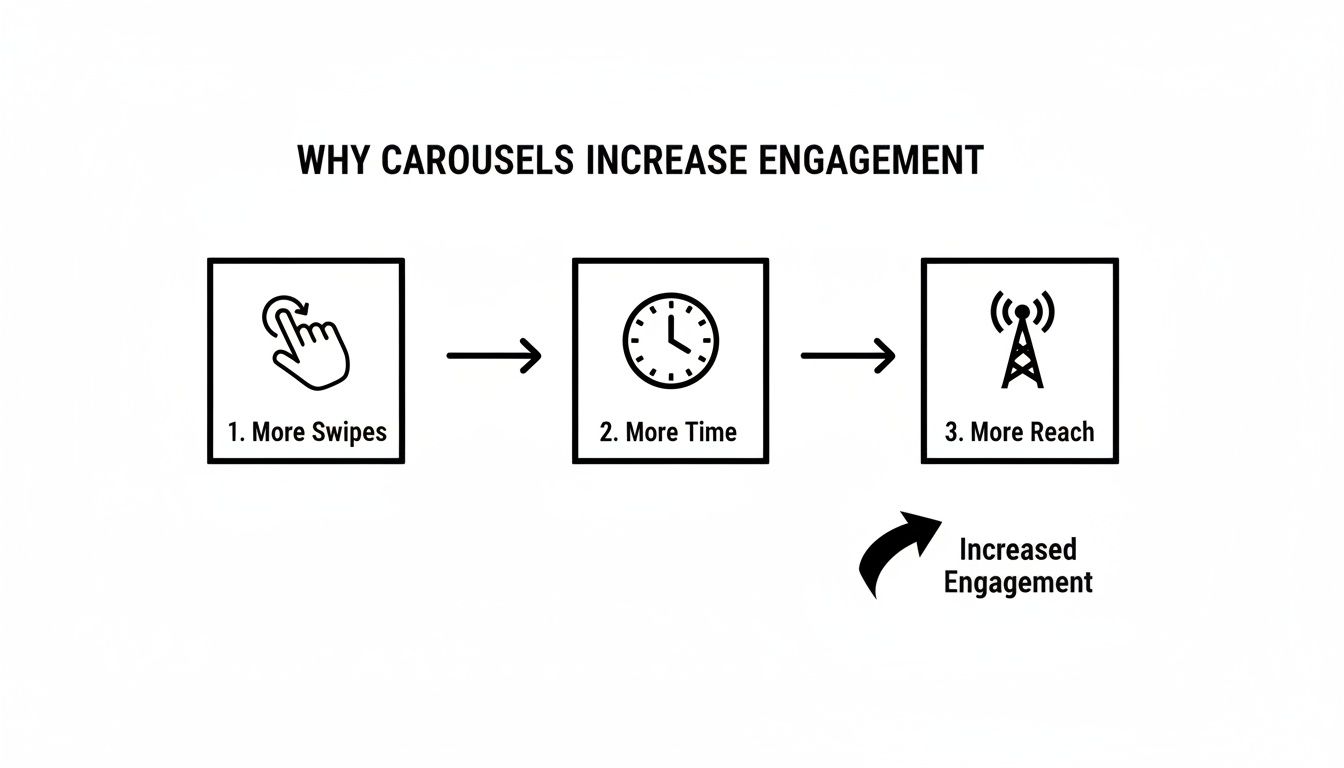
This simple feedback loop is what gets your ad in front of more people. More swipes tell the algorithm your ad is compelling, so it gets shown more often.
For your creative specs, the classic 1:1 square (1080x1080 pixels) is still king for the Instagram Feed. But if you’re also running ads in Instagram Stories, you absolutely need a 9:16 vertical asset to provide that seamless, full-screen experience.
One of the most important settings you'll encounter is a little checkbox: “Automatically show the best performing cards first.”
For most campaigns, especially if you're showcasing a range of products, I strongly recommend leaving this box checked. Let Meta’s algorithm do the heavy lifting for you. It will figure out which card grabs the most attention and show it first.
The big exception? Storytelling. If your carousel is a step-by-step guide, a brand story, or a before-and-after reveal, you need to uncheck that box. In these cases, the narrative flow is everything. The story you’re telling is far more important than which individual card happens to get the most clicks on its own.
Developing Carousel Narratives That Actually Convert

The most successful Instagram carousel ads I've seen aren't just a jumble of product shots. They tell a story. Each swipe is a new chapter, pulling the user deeper in and building momentum toward a specific goal.
Think of it this way: you have up to 10 slides to make a case. Wasting them on random images is a missed opportunity. To really make carousels work, you need a narrative framework that gives people a reason to keep swiping.
The Problem-Solution Showcase
One of the most reliable narrative structures, especially for direct-to-consumer brands, is the Problem-Solution Showcase. It’s incredibly effective because it taps directly into a customer's pain point before you ever mention your product. You're not just selling; you're solving.
Here’s what that looks like in practice for a DTC skincare brand:
Card 1 (The Hook): Start with a relatable image—someone looking totally fed up with their skin. Your headline needs to grab them instantly: "Tired of stubborn breakouts?"
Cards 2-3 (The Problem): This is where you agitate the problem. Show close-ups of redness or blemishes. The copy can talk about the frustration of trying complicated routines that just don't work.
Card 4 (The Solution): Now, you introduce the hero. A clean, beautiful shot of your brand's clarifying serum. Headline: "Meet the simple answer."
Card 5 (The Benefits): Use a simple graphic to list the top benefits. Think punchy and specific: "Reduces redness in 7 days" or "Made with natural ingredients."
Card 6 (Social Proof): Nothing sells like social proof. Use a screenshot of a five-star review or a great piece of user-generated content.
Card 7 (The CTA): End with a clear, direct call-to-action. Show the product again and tell them exactly what to do: "Your clear skin journey starts here. Shop Now."
This flow works because it follows a classic storytelling arc. It builds empathy around a real struggle before presenting a clear, compelling solution.
The Behind-The-Scenes Journey
Another fantastic approach is the Behind-the-Scenes Journey. This is your chance to build trust and show off what makes your brand special. It works wonders for artisanal products, sustainable goods, or anything with a story behind its creation. People love seeing how the sausage is made.
Let's say a DTC coffee company is launching a new single-origin roast. Here’s how they could frame it:
Card 1: A breathtaking photo of the coffee farm in Colombia. Headline: "From the Andes Mountains, to your morning cup."
Card 2: A short video clip showing farmers carefully hand-picking the ripe coffee cherries. The motion here is key.
Card 3: An image of the beans being washed and then laid out to be sun-dried. You're showing the natural process.
Card 4: A shot of the master roaster intently watching over the beans. This highlights the human expertise.
Card 5: A beautiful "beauty shot" of the final, sealed coffee bag.
Card 6: The payoff. A perfect, steaming pour-over in a favorite mug.
Card 7: A strong CTA that ties back to the story: "Taste the Journey" or "Shop the Single-Origin."
This narrative does more than just sell coffee; it sells the origin, the quality, and the passion. It’s how you justify a premium price point and build a connection that a simple product shot could never achieve. When you start thinking like a storyteller, your carousel ads on Instagram become so much more powerful.
The multi-slide format fundamentally changes how Instagram's algorithm evaluates content. Carousels currently generate more than double the impressions of single-image posts, partly because Instagram re-serves unseen slides to users, creating multiple opportunities for engagement from a single ad.
This built-in advantage means your story-driven ad gets more chances to be seen. You're giving the algorithm more material to work with, which directly boosts your reach and engagement. To get a better handle on how all this impacts your numbers, check out our guide on how to improve your click-through rate. Combining these narrative techniques with the carousel format's natural strengths is a recipe for a winning ad campaign.
Smart Targeting and Bidding Strategies for Carousels
You can craft the most compelling carousel in the world, but it won’t matter if the right people never see it. Your success with Instagram carousel ads hinges just as much on who you're targeting—and how you bid for their attention—as it does on the creative itself.
What I love about the carousel format is its sheer flexibility. You can use the same multi-card structure to tell completely different stories depending on where someone is in your marketing funnel, from brand new prospects to loyal customers.
Prospecting Versus Retargeting with Carousels
When you're running prospecting campaigns, you're essentially introducing your brand to a cold audience. A carousel is a fantastic way to make a strong first impression. Instead of showing just one product, you can give them a taste of your entire range or walk them through a quick brand story.
For example, a new coffee brand could use a carousel to show a new user their top-selling blends, their ethical sourcing story, and a special introductory offer—all in one ad.
On the flip side, retargeting is where carousels become a surgical tool for conversion. For a warm audience that’s already browsed your site, you can get incredibly specific. Imagine someone viewed a specific pair of sneakers. You can create a custom audience of everyone who viewed a product in the last 14 days and hit them with a carousel ad that leads with the exact sneakers they saw.
The following cards can then show off different colorways, matching apparel, or glowing five-star reviews. That kind of personalized follow-up is tough for a potential customer to ignore.
Choosing Your Budget and Bidding Approach
When you get to the campaign setup in Ads Manager, you’ll need to decide how to manage your budget. Meta gives you two main ways to do this:
Advantage+ Campaign Budget (CBO): This is Meta's preferred method, and for good reason. You set one budget for the entire campaign, and the algorithm automatically funnels money to the best-performing ad sets. It’s built for efficiency.
Ad Set Budgets: This is the manual approach. You set individual budgets for each ad set, giving you full control. This is really useful if you have distinct audiences—like prospecting and retargeting—that you want to assign a specific, guaranteed amount of spend to.
Your bidding strategy is the other half of the equation. For campaigns focused on driving sales, you'll most likely be choosing between Highest Volume and Cost Per Result Goal.
Highest Volume tells Meta's algorithm to get you the most purchases possible within your budget, no matter the individual cost. A Cost Per Result Goal, however, tells the algorithm to aim for an average cost per purchase, giving you more control over your CPA.
My advice? If you're launching a new campaign, start with Highest Volume. This lets the algorithm gather data and gives you a clear baseline CPA. Once you know what a typical conversion costs you, you can switch to a Cost Per Result Goal to keep your ad spend profitable as you start to scale.
How to Measure and Iterate Your Carousel Performance

Getting your carousel ad live is the easy part. The real advantage comes from what you do next: smart, continuous optimization. To win, you have to look past surface-level metrics like CPA and ROAS and get your hands dirty with the data that shows how people are actually interacting with your ad.
This isn't just a best practice; it's a necessity. In 2025, we saw Instagram's overall engagement dip by about 24% as the platform became flooded with Reels, which saw a 35% jump in volume. This made the feed incredibly competitive. Amid the noise, carousels stood out, consistently pulling in nearly three times the impressions of single-image posts. Understanding these platform-wide engagement trends really drives home why choosing the right format is half the battle.
Beyond Standard KPIs
To truly understand what’s working, you need to track the metrics that are specific to the carousel format. These KPIs tell the story happening inside your ad, not just what happens after someone clicks away.
Swipe-Through Rate: This is your first major health check. It measures the percentage of people who bother to swipe past your first card. If this number is low, your hook is failing. Plain and simple. Time to rethink that opening image or headline.
Card-Level Performance: This is where the gold is. By breaking down performance by individual card, you can pinpoint your winners and losers. If you see a massive drop-off after card #3, you’ve found the weak link in your story that's killing your momentum and costing you conversions.
Outbound Click-Through Rate (CTR): Forget the "All Clicks" vanity metric. Outbound CTR specifically measures clicks on your call-to-action that take users off of Instagram. This is a far more accurate signal of actual purchase intent.
Pulling these numbers manually means wrestling with spreadsheets and trying to connect the dots. It gets even more complicated when you need to tie ad performance back to individual Shopify SKUs to see what’s truly profitable. If you’re trying to build a more robust data pipeline, our guide on the Meta Conversions API is a great place to start.
From Data to Actionable Insights
The goal isn't just to have a dashboard full of data; it's to turn those numbers into clear, confident actions. This is where an execution system like SpendOwlAI completely changes the game by translating raw data into a prioritized to-do list for you and your team.
Instead of getting lost in a sea of noisy charts, imagine receiving a simple, direct insight: "Card #2 in your retargeting carousel has a 50% drop-off rate. Swap it with your top-performing creative from last week's test." That’s the kind of clarity that helps you iterate faster and smarter than your competition.
This approach focuses your attention on what actually moves the needle. It automatically flags critical issues like audience saturation—when an ad set's performance is decaying because it has run out of new people to show to—or creative fatigue, where a once-great ad has simply gone stale. By giving you the "why" behind each recommendation, it helps you make decisions you can trust and ensures you’re always fixing the right problem at the right time.
Answering Your Top Carousel Ad Questions
Once you've got the basics down, you start running into the finer points of building Instagram carousel ads. These are the questions that pop up time and time again, and honestly, getting them right is what separates a decent campaign from one that truly performs. Let's dig into the details I get asked about most often.
How Many Cards Should I Actually Use?
Meta gives you a range of 2 to 10 cards, but the million-dollar question is always, "What's the perfect number?" The truth is, there isn't one. The right number of cards depends entirely on what you're trying to achieve.
Teaching or Storytelling: If you're running a how-to guide or walking users through a detailed process, go long. Using 8-10 cards gives you the space to tell a full story. This often leads to higher engagement, which the algorithm loves, because you're providing real value.
Driving Sales or Clicks: For a direct-response ad focused on a product, keep it short and sweet. I've found that 3-5 cards is the sweet spot. You have enough room to show off key features, different angles, and maybe some social proof without fatiguing someone who’s ready to make a move.
My best advice? Don't just set it and forget it. Keep a close eye on your "swipe-through rate" in Ads Manager. It tells you the exact card where people are dropping off, giving you a clear signal on whether your story is too long or simply not engaging enough.
Should I Mix Videos and Images?
Absolutely. In fact, you probably should. Sticking to just images can get visually repetitive, but a mixed-media carousel keeps things fresh and can seriously increase the time someone spends with your ad.
A great tactic is to lead with a strong hook on the first card—either a thumb-stopping static image or a quick, looping video that's just 3-5 seconds long. After that, alternate between high-quality photos and short clips. For example, a furniture brand could use static images to show a sofa in a beautifully styled room, then add a video card showing someone comfortably sinking into the cushions to highlight the quality. It’s all about creating a more dynamic experience.
What’s the Real Difference Between a Regular Post and an Ad?
This one’s pretty straightforward but crucial. The difference boils down to two things: reach and capability.
An organic carousel post lives on your profile and is shown almost exclusively to your followers. Its success is completely at the mercy of the Instagram algorithm.
A carousel ad, however, is a different beast entirely. It's a paid placement that lets you tap into Meta's incredible targeting suite to find the exact audience you want, whether they follow you or not. You also get powerful features like clickable call-to-action (CTA) buttons ("Shop Now," "Learn More") and access to a goldmine of performance data in Ads Manager. You can even boost an existing organic post, turning it into an ad to give it a second life and get it in front of a much wider audience.
Ready to stop guessing and start executing? SpendOwlAI turns noisy ad data into a clear, prioritized list of actions for your Meta and Google campaigns. See exactly which creatives to swap, which audiences are saturated, and where your budget is best spent. Start your free 7-day trial and execute with confidence.