Mastering accounting for e commerce in 2026
E-commerce accounting isn't just a niche version of regular bookkeeping. It's a completely different discipline built for the speed and complexity of online retail. Think of it as the financial engine that gives you a crystal-clear view of your actual profitability by untangling high-volume sales, confusing platform fees, and ever-changing inventory costs.
Why Generic Accounting Fails Your E-Commerce Business

Your e-commerce brand is a high-speed data machine. You’re juggling sales from Shopify, ad spend on Meta and Google, and a relentless stream of platform fees. Trying to track all of this with traditional accounting methods is like using a city map to navigate a Formula 1 race. You have the basic tools, sure, but you lack the precision needed to make winning moves.
This isn't just an inconvenience; it's a fundamental flaw that completely obscures your true financial performance. Standard accounting practices were designed for a much simpler, slower era of business—not the breakneck pace of digital commerce.
The heart of the problem is that generic accounting can’t keep up with the sheer volume and complexity of e-commerce data. It leaves you with a distorted picture of your business's health, making it almost impossible to make smart, profitable decisions.
This guide will walk you through how specialized accounting for e commerce turns that financial chaos into a clear story, revealing your true profitability.
The Unique Challenges of E-Commerce Finances
The global e-commerce market is growing at a staggering rate, with sales projected to blow past $6.88 trillion in 2026. This massive scale introduces financial hurdles that old-school accounting simply wasn't built for. If you're running a Shopify store and managing ad campaigns, this isn't just a statistic—it's the reality of a structural shift in retail that directly impacts your operations.
Specialized e-commerce accounting is designed to solve the very problems that generic methods create:
High Transaction Volume: A healthy online store can process hundreds, if not thousands, of individual orders every single day. Traditional bookkeeping, which was built around a handful of large invoices, quickly gets buried and becomes riddled with errors.
Confusing Payout Reports: That deposit you get from Shopify or Stripe? It isn't pure revenue. It’s a net amount after they’ve already deducted their platform fees, payment processing costs, and any customer refunds. If you just book that lump sum as "Sales," you're dramatically understating your gross revenue and completely hiding critical expenses.
Complex Sales Tax Nexus: The moment you start selling across state lines, you create a "digital footprint" that can trigger sales tax obligations in dozens of different places. Trying to manage this without the right systems in place isn't just a headache; it's a major compliance risk.
These challenges make it clear why a tailored approach isn't a luxury—it's an absolute necessity. When you move beyond generic methods, you finally gain the clarity you need to measure performance accurately, optimize your spending, and build a business that can truly scale.
Setting Up Your Financial Foundation for Growth
If you're serious about scaling your e-commerce store, your financial setup needs to be more than just basic bookkeeping. It needs to be a roadmap for growth. Getting this right boils down to two key decisions you have to make from the very beginning: choosing the right accounting method and building a custom Chart of Accounts.
Your first big choice is between cash and accrual accounting. Think of cash accounting as using your bank statement as your only source of truth. Money comes in, you record revenue. Money goes out, you record an expense. It's simple, but for an e-commerce business, it creates massive blind spots.
Accrual accounting, on the other hand, gives you a true picture of your business's health. It records revenue the moment you make a sale—not weeks later when the payout finally hits your bank. Likewise, it records expenses when you incur them, not just when you pay the bill. For e-commerce, this is the only way to go.
Why Accrual Accounting Is a Must
Let's walk through a quick, real-world scenario. Imagine you spend $10,000 on Meta ads in May. Those ads drive $30,000 in sales during that same month, but the payouts from Shopify don't actually land in your bank account until the first week of June.
Under cash accounting, your books would show a huge $10,000 loss in May and a sudden, inflated $30,000 profit in June. Based on that data, you might panic and turn off a wildly successful ad campaign.
Under accrual accounting, you record both the $10,000 ad spend and the $30,000 in sales in May. This gives you an accurate view of your profitability for the month by correctly matching the cost with the revenue it generated.
This is called the matching principle, and it’s the secret sauce of good e-commerce accounting. It ensures your profit and loss statement reflects reality, giving you trustworthy data to make smart decisions. Without it, you're flying blind.
Building Your Chart of Accounts
Once you've committed to the accrual method, your next job is to build a proper Chart of Accounts (COA). Don't let the formal name fool you; a COA is just the filing system for all your money. It's the list of categories you'll use to organize every single transaction.
Here’s the catch: the generic COA that comes with software like QuickBooks or Xero just won't cut it. You need to create specific, granular accounts that mirror how an online business actually works. Instead of one vague "Sales" account, you should have separate lines for gross sales, discounts, and returns.
This level of detail turns your accounting software from a passive record-keeper into a powerful business intelligence tool. As our guide on calculating cost per acquisition explains, this clarity is essential for making profitable marketing decisions.
Your Chart of Accounts is the blueprint for financial clarity. A well-designed COA makes your financial reports instantly understandable, while a generic one creates more questions than answers.
With a custom COA, you can answer critical questions in seconds. How much did we lose to refunds last quarter? What were our exact payment processing fees? How much did we spend on shipping versus fulfillment? The answers are right there, cleanly broken out.
Here is a sample Chart of Accounts designed specifically for a Shopify store. Think of it as a starting point for building a financial structure that gives you actionable insights, not just a jumble of transactions.
Sample Chart of Accounts for a Shopify Store
Account Type | Account Name Example | Description |
|---|---|---|
Revenue | Shopify Sales | Records the gross revenue from all sales made on your Shopify store before any deductions. |
Revenue | Sales Discounts | Tracks the total value of all discount codes used by customers during checkout. |
Revenue | Returns & Allowances | A contra-revenue account to record the value of all customer returns and refunds issued. |
COGS | Cost of Goods Sold | Records the direct cost of products sold to customers (product cost, shipping, duties). |
Expense | Shopify Platform Fees | Isolates the monthly subscription and app fees charged directly by Shopify. |
Expense | Payment Processing Fees | Tracks all fees from payment gateways like Shopify Payments, Stripe, or PayPal. |
Expense | Meta Ad Spend | An expense account specifically for tracking all advertising costs from Meta platforms. |
Expense | Google Ad Spend | A dedicated expense account for all advertising costs incurred through Google Ads. |
Using a structure like this as your foundation ensures you're not just tracking numbers—you're generating intelligence that can guide your entire business strategy.
Decoding Your Revenue Payouts and Platform Fees
The path your money takes from a customer's wallet to your bank account is never a straight line. One of the most common—and costly—mistakes I see in accounting for e commerce is booking the final Shopify or Stripe deposit as your total revenue. This isn't just a small error; it's a practice that completely obscures the true health of your business.
Think of your sales as a waterfall. The gross sale—the full amount a customer pays—is the massive pool of water at the very top. As that water flows down toward your bank account, several streams get diverted along the way.
This waterfall analogy is absolutely critical. Discounts, refunds, payment processing costs, and platform fees are all streams that divert cash before it ever hits your bank. If you only look at the puddle that’s left at the bottom, you have no idea how much water you started with or where it all went.
To get a clear financial picture, you have to start at the top. That means recording the full, initial value of every sale as your gross revenue. Only then can you track each deduction as it happens.
The Problem with Net Payouts
When you get a payout summary from a platform like Shopify, it’s a consolidated mess of transactions. A single deposit might represent dozens of individual sales, all mashed together and reduced by refunds, chargebacks, and a laundry list of fees. If you just book this net number, you create two huge problems for yourself:
Understated Revenue: Your top-line revenue will look much lower than it actually is. This throws off every single important metric, from marketing return to profit margins.
Hidden Expenses: You completely lose sight of crucial operating costs. How much are you really paying in payment processing or platform fees? With this method, you have no clue.
Building a solid financial foundation is all about avoiding these traps from the very beginning.
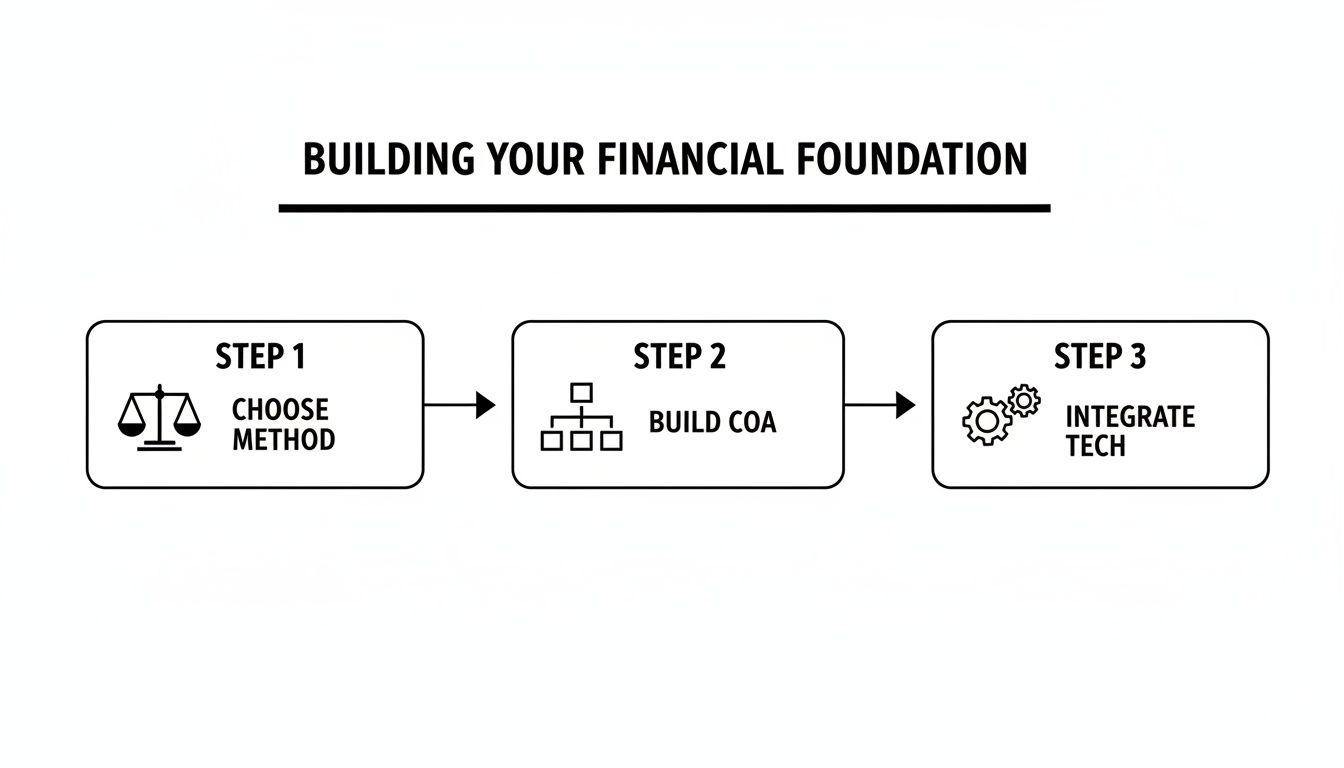
As you can see, it boils down to a clear process: choosing your accounting method, building a proper Chart of Accounts, and getting your tech stack to talk to each other automatically.
A Practical Example of the Waterfall
Let's walk a single $100 sale through this waterfall process. You’ll see why this level of detail is non-negotiable for accurate books.
Gross Sale: The first thing you do is record the full $100 in a revenue account like "Gross Sales." This is the top of your waterfall and represents your actual top-line revenue.
Payment Processing Fee: Stripe or Shopify Payments takes their cut right away. Let's say it's $2.50. That amount gets recorded in a specific expense account, maybe "Payment Processing Fees."
Platform Fee: Your e-commerce platform might also charge a small transaction fee on top of that, say $0.50. This goes into another dedicated expense account, like "Shopify Transaction Fees."
Net Deposit: What's left from this one sale is $96. This is the cash that will eventually be bundled with other transactions and deposited into your bank account.
By tracking each step, you get a crystal-clear view of the transaction. You know you generated $100 in revenue, and it cost you $3.00 in fees to make that sale happen. This kind of granular detail is the bedrock of effective, data-driven marketing solutions, because it's the only way to know if you're actually profitable.
Adopting this waterfall approach transforms your accounting from a bookkeeping chore into a powerful strategic tool. You get a precise measure of your top-line revenue, which allows you to accurately calculate marketing ROI, product-level profitability, and true customer lifetime value. If you’re not doing this, you're flying blind.
How to Master COGS and Inventory Accounting
If you're selling physical products, your entire financial world revolves around one critical number: Cost of Goods Sold (COGS). Getting a handle on COGS is the only way to know if you're actually making money. But this is where most brands trip up, making a simple—and costly—assumption. They assume COGS is just what they paid their supplier for the product.
In reality, that's just the tip of the iceberg. Proper accounting for e commerce requires you to track your landed cost. This is the total cost to get one unit of your product onto your warehouse shelf, ready to be picked, packed, and shipped.
Think about it like ordering a new couch. The price tag is just the starting point. You still have to pay for shipping, maybe a separate delivery fee to get it into your living room, and perhaps even an assembly charge. Your inventory is exactly the same.
Calculating Your True Landed Cost
To get your true landed cost, you have to look past the supplier's invoice. Every single dollar you spend to acquire and prepare your inventory for sale has to be included in the calculation.
Your landed cost formula should always include these components:
Product Cost: The base price you pay the manufacturer for each unit.
Freight & Shipping: What it costs to get the goods from the factory to your warehouse or 3PL.
Import Duties & Tariffs: Any taxes and fees customs charges when your products enter the country.
Inbound Packaging & Prep: Costs for things like custom boxes, poly bags, or any prep work needed before an item is ready for a customer.
Once you add all these costs together, you divide that total by the number of units in the shipment. The result is your per-unit landed cost. This number, not the simple supplier price, is what you have to use to calculate your true COGS and gross margin.
The All-Important Timing Principle
Now for the single most important rule in inventory accounting: you only record COGS when a product is sold, not when you purchase it. This is a fundamental concept of the accrual method we talked about earlier.
When you buy $20,000 worth of inventory, you haven't spent $20,000 in an accounting sense. You've simply swapped one asset (cash) for another (inventory). That inventory just sits on your balance sheet, representing value that your business owns.
The expense is only recognized at the exact moment a customer buys the product. A sale is what triggers the inventory to move from an asset on your balance sheet to an expense (COGS) on your profit and loss statement.
Getting this timing right is everything. It ensures you're perfectly matching the cost of an item with the revenue it generates in a given period. Without this discipline, your financial reports become a confusing mess, and you lose sight of your true profitability.
How Inventory Valuation Affects Your Profit
Things get interesting when you buy inventory in different batches at different prices. You have to decide which cost to apply when you sell a unit. This is done using an inventory valuation method, and for e-commerce, the most common is First-In, First-Out (FIFO).
FIFO is exactly what it sounds like: it assumes the first units that came into your warehouse are the first ones to be sold. Think of your inventory like a Pringles can—you have to get through the chips at the top to reach the ones at the bottom.
Let's walk through an example:
January: You buy 100 units at $10 each.
March: Your supplier's prices increase, so you buy another 100 units at $12 each.
April: You sell one unit.
With FIFO, you assume you sold one of the first units you bought back in January. So, your COGS for that sale is $10. Your remaining inventory is then valued based on the 99 units left at $10 and the 100 units at $12. This choice directly impacts your gross profit and, ultimately, how much you owe in taxes.
Nailing your COGS isn't just a boring accounting task. It has a massive downstream effect on your marketing. If your COGS is too low, you might think a Meta ads campaign is a home run when it’s actually losing money. Accurate landed cost and inventory accounting give you the solid financial foundation you need to scale your brand with confidence.
Mastering Sales Tax and Ad Spend Allocation
Two areas can quickly trip up even the most promising e-commerce brand: sales tax and advertising costs. Getting these wrong isn't just a bookkeeping error; it's a direct threat to your profitability and legal standing. You could find yourself facing hefty fines or, just as bad, pouring money into ad campaigns without knowing what's actually working.
Let’s start with the financial minefield of sales tax. As soon as you start selling to customers outside your home state, you’ll run headfirst into the concept of sales tax nexus.
Think of nexus as an economic connection your business forms with a state. If that connection gets strong enough—either through a certain amount of sales or a specific number of orders—that state considers you active on their turf. This triggers an obligation for you to start collecting and paying sales tax there.
What Is Sales Tax Nexus?
The rules around nexus changed dramatically after the South Dakota v. Wayfair Supreme Court decision. Before, you generally needed a physical presence (like an office or warehouse) to create a tax obligation. That’s no longer the case. Now, your economic activity alone can put you on the hook.
With the U.S. e-commerce market projected to hit $1.62 trillion by 2026, it's no surprise that brands are crossing these state lines more frequently. This data, highlighted in Capital One Shopping's e-commerce research, shows just how easy it has become to hit a state's sales or transaction threshold, often without even realizing it.
For a growing brand, the question isn't if you will have nexus in multiple states, but when. The only sane approach is to have a plan and use compliance software like TaxJar or Avalara. Trying to track this manually is a recipe for disaster.
Accounting for Your Advertising Spend
Just as critical as tax compliance is getting a real handle on your ad costs. Far too many brands simply record a single, lump-sum expense for "Marketing" at the end of the month. This approach tells you nothing about which channels are making you money and which are burning it.
The first step is to clean up your Chart of Accounts. At a minimum, you need separate expense accounts for each major platform, like "Meta Ad Spend" and "Google Ad Spend." This gives you a high-level view of where your budget is going. But the real magic happens when you go deeper.
The Power of SKU-Level Attribution
To truly understand your profitability, you need to connect your accounting data directly to your marketing efforts through SKU-level ad spend attribution. This means you stop looking at just channel performance and start asking much sharper questions:
How much did we spend on Google Ads last month specifically to sell our blue T-shirt?
What was the actual profit on that T-shirt after subtracting its unique advertising cost?
Is our most popular ad campaign even profitable when we look at the margins of the products it sells?
This level of detail transforms your accounting from a simple historical record into a powerful strategic tool. It connects the dots between your ad platforms and your bank account, showing you exactly which products are driving profitable growth. You can even use this data to calculate your campaign break-even point, which you can learn more about in our guide on how to calculate Break-Even ROAS.
By mastering both sales tax and granular ad spend tracking, you’re not just staying out of trouble. You’re building a financial foundation that gives you a significant competitive edge.
Your E-Commerce Month-End Close Checklist
Let’s be honest: the end of the month can feel like a mad dash to the finish line. For so many e-commerce brands, it’s a chaotic scramble. But it doesn’t have to be. A solid month-end close is a disciplined process—it's your regular financial health check that turns a flood of raw data into confident, clear business decisions.
Think of it as your chance to pause, verify every number, and produce clean financial statements that tell the real story of your performance. The goal here is simple: an accurate Profit & Loss statement and a rock-solid Balance Sheet. This gives you unwavering confidence in the data you use to plan your inventory, budget for ads, and steer the entire business forward.
The Modern Tech Stack for E-Commerce Accounting
If you’re still wrestling with spreadsheets and manual data entry, you’re making this harder than it needs to be. The best way to run your month-end close is with an integrated tech stack that does the heavy lifting for you. For most stores on Shopify, this means getting a three-part system to work in perfect harmony.
Accounting Software: This is your financial home base. We're talking about platforms like QuickBooks Online or Xero, where your official records live.
E-Commerce Platform: Your sales engine—Shopify itself. This is where all your gross sales, discounts, and refund data originates.
Middleware Connector: This is the critical bridge. A tool like A2X or PayTraQer automatically fetches detailed sales and fee data from Shopify, organizes it correctly, and posts summarized journal entries to your accounting software.
This setup is what automates the "waterfall" process we covered earlier, making sure every single transaction, platform fee, and refund is accounted for without you lifting a finger.
An automated tech stack is the foundation of a painless month-end close. By connecting your sales channel directly to your books via middleware, you eliminate the single biggest source of errors and wasted time: manual data entry.
Once this system is running, your monthly checklist shifts from tedious data crunching to a streamlined process of verification and review.
Your Step-by-Step Month-End Checklist
Follow these steps every single month. This turns your accounting for e commerce from a reactive chore into a proactive, strategic advantage.
Reconcile All Bank and Credit Card Accounts: Open your accounting software and go line-by-line through your bank feeds. Match the deposits to the payouts from Shopify, and categorize every single expense, from your software subscriptions to the latest shipment of packing tape. This is how you confirm your cash balance is spot on.
Verify Platform Payouts: Your middleware tool does the heavy lifting, but you need to do the spot check. Confirm that every payout from Shopify, Stripe, or PayPal has been posted correctly to QuickBooks or Xero. This step is your final check that gross revenue is stated correctly.
Confirm Ad Spend Totals: Log in to your ad platforms—think Meta and Google Ads. Pull the total spend for the month and make sure it matches the expense figures in your accounting software. Simple, but crucial for understanding your true customer acquisition costs.
Record Inventory and COGS Adjustments: This is where so many e-commerce brands get it wrong. You need to update your inventory asset account for any new products you purchased during the month. Then, you'll record the corresponding Cost of Goods Sold (COGS) for everything you sold, officially moving that value from an asset on your balance sheet to an expense on your P&L.
Review Sales Tax Liability: Open up your sales tax software (like TaxJar or Avalara) and look at your total liability for the month. Record this amount on your balance sheet. This ensures you’ve got the cash properly earmarked and set aside for when it's time to remit those taxes.
Generate and Review Financial Statements: Now for the payoff. Run your two most important reports: the Profit & Loss (P&L) statement and the Balance Sheet. Take a hard look. Does the P&L make sense? Are your gross margins where you expected? Are your ad costs in line? Finding the answers here is the real reward for a disciplined month-end close.
Frequently Asked Questions About E-Commerce Accounting
Even after laying out the whole playbook, some questions always pop up. Let's tackle a few of the most common "what-ifs" we hear from founders trying to get their accounting for e commerce right.
Do I Really Need An Accountant for My Shopify Store?
Look, I get it. In the early days, you do everything yourself, and your books are no exception. With a tool like QuickBooks, you can absolutely get started on your own.
But e-commerce has its own special brand of accounting chaos. High transaction volumes, multi-state sales tax, and accurately valuing your inventory are where things get messy—fast. If you're spending more than a couple of hours a month on your books, or worse, you have that nagging feeling that your numbers aren't really right, it's time to call in a pro. Think of it as buying back your time and getting the peace of mind that your financial foundation is solid.
What Is the Difference Between Cash and Accrual Accounting?
This is probably the single most important concept for any e-commerce operator to understand. With cash accounting, you only record a transaction when money actually changes hands. A sale isn't a sale until the cash from Shopify lands in your bank account, and an expense isn't an expense until you pay the bill. It’s simple, but it’s also misleading.
Accrual accounting, on the other hand, gives you a far more accurate picture of your business's health.
Accrual accounting records revenue when it’s earned (the moment a customer clicks “buy”) and expenses when they are incurred. This method correctly matches the ad spend from May to the sales it generated in May, even if you don't receive the cash until June. Cash accounting can dangerously misrepresent your performance.
For any serious e-commerce business, accrual is the only way to go.
How Do I Account for Free Products Sent to Influencers?
When you send out freebies to influencers, it's tempting to think of it as a "zero-dollar sale," but that’s not quite right. You didn't make a sale, so you can't record Cost of Goods Sold (COGS).
Instead, you're trading inventory for brand exposure. The right way to track this is to treat the cost of that product as a marketing expense.
Here’s how the journal entry breaks down:
Debit (Increase) "Marketing & Promotion Expense": This records the cost of the item as a business expense.
Credit (Decrease) "Inventory": This removes the item's cost from your inventory asset account.
This simple entry correctly categorizes the cost as part of your customer acquisition efforts. If you also paid the influencer a cash fee, that would be a separate, more straightforward marketing expense.
SpendOwlAI is the daily execution system that turns noisy ad data into clear, actionable guidance for operators managing Meta, Google, and Shopify. It helps you avoid over-editing, prevent wasted spend, and execute with confidence. Start your free 7-day trial and see what you've been missing.